Upgrades
The BIQU Panda upgrades worth buying
One third-party brand makes most of the aftermarket for these printers. That makes it easy to over-buy, so this page is ordered by what each part actually fixes.
By Michael W. · Published October 11, 2026
Some links here are Amazon affiliate links, so a purchase may earn this site a commission at no cost to you. It does not change what gets recommended or the order it appears in — how that works.
Quick picks
Tap any row to jump to the full write-up. Prices are read from Amazon and dated; stock is always whatever the listing says.
| # | Product | Best for | Price |
|---|---|---|---|
| 1 |  BIQU Panda Touch A 5-inch touchscreen powered from the printer's own USB port. This is the feature people buy a P2S for, at a fraction of a new machine. | Best Panda upgrade Giving a P1P or P1S the touchscreen it never had | $55.99 · View on Amazon #ad We earn a commission · price as of October 10, 2026 |
| 2 |  BIQU PyroGrip Textured PEI Plate Textured PEI on the same mounting system as the official plate, cited at roughly half the price. The part that makes owning two plates reasonable. | Best value Panda part Textured PEI at roughly half the official price, on the same mounting system | $18.99 · View on Amazon #ad We earn a commission · price as of October 10, 2026 |
| 3 | 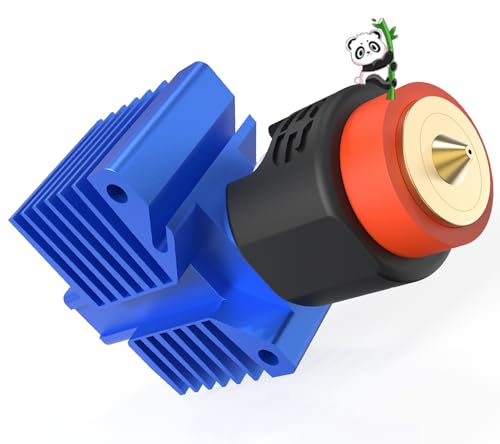 BIQU Panda Revo Hotend An E3D Revo quick-change hotend for the P1S, P1P and X1C. Nozzle diameter becomes a per-print decision instead of a maintenance task. | Best if nozzle changes stop you Getting quick nozzle changes on a P1S without buying a P2S | $139.99 · View on Amazon #ad We earn a commission · price as of October 10, 2026 |
| 4 |  BIQU Panda Claw Extruder Gear Set Nano-coated hardened steel extruder gears for the X1, P1 and A1 series. The fix for gears chewing filament instead of pushing it. | Buy only as a repair Worn extruder gears that are chewing filament instead of pushing it | $24.99 · View on Amazon #ad We earn a commission · price as of October 10, 2026 |
The short answer
Buy the Panda Touch first. It fixes the single most-complained-about thing on a P1P or P1S — no screen — mounts in the existing cutout, and powers from the printer's USB port.
Then buy a spare plate. The PyroGrip is textured PEI on the same mounting system, cited at roughly half the official plate, which is what makes a second plate an easy decision rather than an indulgence.
Buy the rest only against a named fault. Extruder gears, cooling ducts and extruder housings all fix specific symptoms. Bought speculatively they change nothing, and one of them — extra cooling — actively hurts ABS and ASA.
Why one brand dominates this aftermarket
BIQU, part of BIGTREETECH, has built the broadest third-party catalog for these machines: screens, hotends, build plates, fans and ducts, extruder parts, racks and AMS accessories. OpenELAB's range overview and 3DWithUs's testing of the line both cover the same breadth, and that breadth is exactly the trap. A catalog this wide makes it easy to buy five parts when one was needed.
So the rule for this page is the rule for the whole hub: name the print that failed or the task that annoyed you, then find the part. If you cannot name it, the upgrade is entertainment. The main upgrades page applies the same test across every brand.
The range, by what it fixes
| Part | Fixes | Fits | Buy it? |
|---|---|---|---|
| Panda Touch | No touchscreen on P1P/P1S | P1P, P1S; interfaces with X1 and A1 | Yes - first |
| PyroGrip plate | One plate means one failure stops you | Same mount as the official plate | Yes - second |
| Panda Revo hotend | Nozzle changes are a hotend job | P1S, P1P, X1C | If diameter changes matter |
| CryoGrip Pro plate | No spare plate | P1S, P1P, P2S, X1C, X1E, X2D, A1 | As a second plate |
| Panda Claw gears | Worn gears chewing filament | X1, P1, A1 series | Only as a repair |
| Panda Jetpack duct | Curling overhangs and bridges | P1/X1, with Revo and Flow hotends | PLA and PETG only |
| Panda Turbo fan | Not enough auxiliary airflow | X1 and P1 | Rarely - see the warning |
| Panda Stack rack | An A1 and AMS Lite eating a desk | A1 and A1 mini | Organization only |
| Panda CNC housing | Toolhead mass at high speed | P1 and X1 | Only if you print fast |
The cooling warning, because it is the common mistake
Three parts in that table add airflow: the Jetpack duct, the Turbo fan and the A-series Breeze fan. They work, and on PLA and PETG a reshaped air path at the nozzle is a genuine fix for overhangs that curl no matter what you do in the slicer.
On ABS and ASA, more cooling causes layer splitting. Those materials need chamber heat, and an enclosed machine with extra fans is a machine fighting the enclosure you bought. If your problem is warping rather than curling, airflow is the wrong direction entirely — why prints warp has the right one.
What to print instead of buying
Several things in this category are solved by filament rather than money. Spool holders, tool trays, accessory boxes, cable guides and risers are all good prints and the material cost is trivial. The parts worth paying for are the ones where a printed version fails: anything in the hot chamber, anything structural under load, and anything electronic.
The Panda Stack is the clearest example of the boundary. It is aluminum, and the registry notes that is what stops it flexing under four loaded spools, where a printed frame would. If you only mount two spools, print the riser instead. Printed versus bought draws that line in detail.
What this page is and is not based on
Fitment, material and stated-benefit rows are registry spec rows whose provenance is documented in content/products.ts; the range-level sources are 3DWithUs's testing of the Panda line and OpenELAB's range overview, both listed below and retrieved 11 October 2026. We have not installed every part on this page. There is no test lab here and how we review says so. No price is stated in this copy — the buy buttons carry whatever Amazon is charging today.
Every pick in full
#ad We earn a commission · price as of October 10, 2026
1. Best Panda upgrade
BIQU Panda Touch
A 5-inch touchscreen powered from the printer's own USB port. This is the feature people buy a P2S for, at a fraction of a new machine.
The P1P and P1S shipped without a touchscreen, and that single omission is the most common complaint about the best-selling enclosed machine in the lineup. The Panda Touch answers it directly: a 5-inch touchscreen that mounts in the existing screen cutout and draws power from the printer's own USB port, so there is no wiring job and no external supply.
Two details raise it above a convenience. The registry records that it controls up to ten Bambu printers from one unit, which makes it the cheapest print-farm console available, and that the vendor states installation does not void the printer warranty — unusual for third-party hardware and worth knowing before you open the box.
The honest risk is the one every third-party control layer carries: firmware sitting between you and the printer can lag behind a Bambu update, so a machine update occasionally means waiting for the screen to catch up. The full Panda Touch review covers that, and the camera upgrade page covers the variant that fixes the stock camera at the same time.
What it gets right
- This is the feature people buy a P2S for, at a fraction of a new printer
- Powered from the printer's own USB port, with a bracket that fits the P1P/P1S screen cutout
- Controlling up to 10 printers from one screen makes it the cheapest print-farm console there is
What it does not
- It is a control surface, not a capability — it changes nothing about print quality
- Third-party firmware sitting between you and the printer can lag behind a Bambu firmware update
- If you genuinely never wanted a screen, skip it; the app does the same job
| Screen | 5-inch touchscreen |
|---|---|
| Fits | Bambu Lab P1P and P1S; also interfaces with X1 and A1 series |
| Power | The printer's built-in USB port |
| Multi-printer | Controls up to 10 Bambu printers from one unit |
| Warranty | Vendor states installation does not void the printer warranty |
#ad We earn a commission · price as of October 10, 2026
2. Best value Panda part
BIQU PyroGrip Textured PEI Plate
Textured PEI on the same mounting system as the official plate, cited at roughly half the price. The part that makes owning two plates reasonable.
This is the least exciting item in the Panda range and the one most likely to pay for itself. Plates are consumables: skin oils and scraping both shorten PEI life, and when adhesion finally goes, a machine with one plate stops printing while a machine with two keeps going.
The registry records the PyroGrip as textured PEI on the same mounting system as the official plate at a cited price position of roughly half it, which is what turns “keep two or three plates on the shelf” from an indulgence into an obvious decision. No adapter, no modification — it drops onto the magnetic bed you have.
What to expect: third-party PEI varies more in thickness and coating consistency than one brand's own line does, so plan on re-checking Z offset when you swap brands mid-queue. That is a two-minute job, not a problem. The build plate roundup ranks the whole field.
What it gets right
- Same surface technology and mounting as the official plate at a much lower price point
- Makes keeping two or three plates on the shelf a reasonable decision rather than an expensive one
- No adapter, no modification — it drops onto the magnetic bed you already have
What it does not
- PEI thickness and coating consistency vary more between third-party plates than within one brand's official line
- Expect to re-tune Z offset when you swap brands mid-queue
- Not a performance upgrade over the official plate — a price one
| Surface | Textured PEI |
|---|---|
| Mounting | Same mounting system as the official plate |
| Price positioning (cited) | Roughly half the official plate |
#ad We earn a commission · price as of October 10, 2026
3. Best if nozzle changes stop you
BIQU Panda Revo Hotend
An E3D Revo quick-change hotend for the P1S, P1P and X1C. Nozzle diameter becomes a per-print decision instead of a maintenance task.
On a P1S a nozzle change is a hotend job. The practical consequence is that nobody does it, so everything gets printed at 0.4 mm whether that is the right choice or not — functional parts that would be faster at 0.6 mm, fine detail that wants 0.2 mm.
The Revo system changes nozzles by hand in seconds, and the registry lists this hotend for the P1S, P1P and X1C with high-flow, high-speed positioning. That is the single feature people pay P2S money for, bought as a part.
Two real costs. You are off the official hotend, which makes a Bambu support conversation harder, and Revo nozzles cost more per nozzle than Bambu's own. Flow calibration also has to be redone — do not expect old profiles to be exactly right. The nozzle roundup compares it against the official hardened parts.
What it gets right
- Revo nozzles change by hand in seconds — this is the single feature people buy a P2S for
- High-flow geometry is a genuine throughput gain on large single-color prints
- Turns nozzle diameter into a per-print choice instead of a maintenance decision
What it does not
- You are now off the official hotend, so a Bambu support conversation gets harder
- Revo nozzles cost more per nozzle than Bambu's own
- Flow calibration has to be redone; do not expect your old profiles to be exactly right
| System | E3D Revo quick-change nozzle |
|---|---|
| Fits | Bambu Lab P1S, P1P and X1C |
| Positioning | High-flow, high-speed |
#ad We earn a commission · price as of October 10, 2026
4. Buy only as a repair
BIQU Panda Claw Extruder Gear Set
Nano-coated hardened steel extruder gears for the X1, P1 and A1 series. The fix for gears chewing filament instead of pushing it.
This part is in the picks to make a point about the Panda range: a lot of it is repair hardware rather than upgrade hardware, and buying it preemptively is how people spend money without changing a print.
Extruder gears are a wear item. Worn ones under-extrude, and under-extrusion looks like six other faults — gaps in top surfaces, weak layers, inconsistent walls. The registry lists these as golden nano-coated hardened steel, fitting the X1, P1 and A1 series, with better grip stated for PLA, PETG, TPU and ABS. The TPU case is the one people report most: the stock set slips on soft filament.
Diagnose before you buy. The Bambu wiki's own extruder procedure is the reference for getting in there, and print quality issues is the page for working out whether the gears are actually your fault.
What it gets right
- Extruder gears are a wear item, and a worn set causes under-extrusion that looks like six other faults
- Hardened and coated gears grip TPU better than the stock set, which is the common TPU-slipping complaint
- Fits X1, P1 and A1 — one part number for most of the lineup
What it does not
- This is a repair for a real symptom, not an upgrade to buy preemptively
- An extruder teardown is the most intimidating job on the machine for a first-timer
- If your gears are not worn, new gears will change nothing
| Material | Golden nano-coated hardened steel gears |
|---|---|
| Fits | Bambu X1, P1 and A1 series |
| Materials supported | PLA, PETG, TPU, ABS |
| Stated benefit | Improved grip, fewer jams |
Questions people actually ask
Which BIQU Panda upgrade should I buy first?
The Panda Touch, if you own a P1P or P1S. It adds the 5-inch touchscreen those machines shipped without, mounts in the existing screen cutout and powers from the printer's own USB port, and the registry records that it controls up to ten Bambu printers from one unit. After that, a spare build plate - the part most likely to keep the machine printing.
Are BIQU Panda parts compatible with every Bambu Lab printer?
No, and this is where money gets wasted. Fitment is per part: the Revo hotend is listed for the P1S, P1P and X1C, the Juicer hotend for the A1 and A1 mini, the Breeze fan for the A1 only, and the Stack rack for the A1 and A1 mini. Check each part against your exact model rather than assuming the brand covers it.
Does installing a Panda Touch void the Bambu Lab warranty?
The registry records that the vendor states installation does not void the printer warranty, which is unusual for third-party hardware. That is the vendor's statement rather than ours, so treat it as such and confirm it against current terms before you install anything.
Will a Panda cooling fan or duct improve my prints?
On PLA and PETG, often yes - a reshaped air path at the nozzle is a real fix for overhangs that curl despite slicer changes. On ABS and ASA it makes things worse, because those materials need chamber heat and extra cooling causes layer splitting. If your problem is warping rather than curling, airflow is the wrong lever.
Should I buy Panda extruder gears preemptively?
No. They are a repair for a real symptom - worn gears that chew filament instead of pushing it, which shows up as under-extrusion. On a healthy extruder new gears change nothing, and the teardown is the most intimidating job on the machine. Diagnose first.
Is a third-party build plate as good as the official one?
For a spare, yes, and that is the point. The PyroGrip is textured PEI on the same mounting system at a cited price position of roughly half the official plate. It is not a performance upgrade over a healthy official plate - it is what makes owning two plates affordable, and plate coating consistency varies more between brands, so re-check Z offset when you swap.
Sources
- Third-party testing of the BIGTREETECH Panda accessory range on Bambu Lab printers - 3DWithUs, retrieved 2026-10-11
- BIQU Panda range overview - build plates, hotends, fans, extruder parts and AMS accessories, and which Bambu Lab models each is listed for - OpenELAB, retrieved 2026-10-11
- Bambu Lab P1S extruder upgrade and service procedure - Bambu Lab wiki, retrieved 2026-10-11
- Every fitment list, material and stated-benefit row below is a registry spec row; provenance for each is documented in content/products.ts. Nothing here was measured by this site
Read this next
- The best Bambu Lab upgradesUpgrades ranked by the problem each one solves, with the popular ones that fix nothing clearly marked as such.
- BIQU Panda TouchWhat the Panda Touch adds to a P1P or P1S, the ten-printer capability nobody mentions, and the honest trade of third-party firmware.
- P2S mods worth doingThe P2S ships with a screen and a quick-swap nozzle, so the mod list is short: plates, an AMS, and almost nothing from the P1S catalog.
- P1S mods worth doingP1S modifications ordered by the problem each solves, with the popular ones that change nothing clearly marked.
- The best build plates for a Bambu LabTextured, dual-texture or third-party - which plate to buy, and why owning two beats owning one good one.
- Printed vs bought upgradesThe rule that decides printed versus bought, the PLA-in-a-warm-chamber trap, and which parts must never be printed.