AMS & Color
AMS 2 Pro compatibility and the filament buffer
Which printers take it, why there are two kits, and what the filament buffer in the box is actually for. Ordering the wrong variant is the commonest mistake here.
By Michael W. · Published October 17, 2026
Some links here are Amazon affiliate links, so a purchase may earn this site a commission at no cost to you. It does not change what gets recommended or the order it appears in — how that works.
The short answer
The AMS 2 Pro upgrade kit is listed as compatible with the Bambu Lab P1P, P1S, X1C and X1E. That is the 3DJake listing's own compatibility statement, retrieved 17 October 2026. The A1 and A1 mini are not on it and take the AMS Lite instead.
There are two kit variants and they are not interchangeable. The kit with the Filament Buffer is for connecting a single AMS 2 Pro. If you want to connect multiple AMS 2 Pro units, the same listing states you need the kit with the hub for the serial connection.
The filament buffer is part of the single-unit kit, not an optional extra. It ships in that box alongside the Bambu Bus Cable (4-pin), the AMS 2 Pro Switching Adapter, PTFE tube couplers and PTFE tubes in several lengths.
Compatibility, printer by printer
| Printer | AMS 2 Pro upgrade kit | What it means for you |
|---|---|---|
| P1P | Listed as compatible | Kit plus unit; the usual upgrade path |
| P1S | Listed as compatible | Kit plus unit; the most common case on this site |
| X1C | Listed as compatible | Kit plus unit |
| X1E | Listed as compatible | Kit plus unit |
| A1 / A1 mini | Not listed | Takes the AMS Lite instead — the registry records the A-series as incompatible with the P/X-series AMS units |
| P2S and newer combos | Not listed on this kit | Combo machines ship with the connection already made; check what your box included before ordering a kit |
| H2 series | Not listed on this kit | No source we fetched lists this kit for the H2 series, so this page does not claim it either way |
What the filament buffer does
The buffer is the part of this kit people cannot place, and the name is unhelpful. It is not storage and it is not a dryer. It is a slack manager: it holds a small loop of filament between the AMS and the printer so the extruder can pull and retract without fighting the unit's feed motor.
That matters because a multi-material print is constantly loading, retracting and unloading. Without somewhere for a few centimetres of filament to go, every retraction is transmitted straight back down a long PTFE tube to a motor that is not expecting it. The buffer takes up that slack mechanically.
The practical point for ordering is simply that it is included in the single-unit kit. You do not buy it separately and you should not leave it out of the installation because you cannot see what it is for.
One unit or several: which kit to order
One AMS 2 Pro: the kit with the filament buffer
The 3DJake listing states this variant is ideal for those who wish to connect only one AMS 2 Pro. For the overwhelming majority of P1S and X1C owners this is the right box, and it contains everything the connection needs.
Several AMS 2 Pro units: the kit with the hub
The same listing states that connecting multiple AMS 2 Pro units requires the kit with hub for the serial connection. If you are running eight or twelve materials, that is the variant to order — and ordering the buffer kit first means ordering twice.
Worth a sanity check before you commit to multiple units: more spools means more tool changes, and every tool change purges filament. The registry's note on the AMS 2 Pro applies with force here — the purge tower is real and it is not small. Multi-color printing without an AMS is the page for whether you need this scale at all.
What is in the box
The official Bambu Lab store page lists the kit contents as the Bambu Bus Cable (4-pin), the AMS 2 Pro Switching Adapter, PTFE tube couplers and PTFE tubes in multiple lengths; the 3DJake listing adds the Filament Buffer for the single-unit variant. The store page also records the switching adapter as the requirement for drying, which is the detail worth underlining.
That is why “can I just buy the unit” has an awkward answer. Without the adapter you may have a four-spool changer and not the dryer you paid for. The AMS 2 Pro upgrade kit, explained goes through the parts list properly, and which AMS to use with a P1S is the page if the P1S is your machine.
Where this page came from
This page exists because Google is already showing the site for the query “ams 2 pro upgrade compatibility kit filament buffer” — 5 impressions at an average position of 17.6 over the last 28 days — with no page written for it. That is measured Search Console data for this domain, and it is the only number about demand claimed anywhere on this page.
What this page is and is not based on
The compatibility list (P1P, P1S, X1C, X1E), the inclusion of the Filament Buffer in the single-unit kit and the statement that multiple units require the hub variant come from the 3DJake AMS 2 Pro Upgrade Kit listing retrieved 17 October 2026. The kit contents and the switching adapter's role in drying come from the official Bambu Lab store product page retrieved 6 October 2026. AMS unit capabilities and the A-series incompatibility are registry spec rows whose provenance is documented in content/products.ts. We have not installed this kit on a bench; there is no test lab here and how we review says so. No price appears in prose.
What to buy
Stock photograph of this product class, not of this specific unit.
#ad We earn a commission · price as of November 20, 2026
1. The unit itself
Bambu Lab AMS 2 Pro
Four spools with active drying, humidity monitoring and RFID logging. The upgrade kit is what connects it to a printer that did not ship with one.
The unit is the easy part of this decision. The registry lists the AMS 2 Pro as a four-spool automatic material system whose headline feature is active filament drying, inheriting humidity monitoring and RFID logging from the original AMS. For a P1S or X1C owner the registry calls it the single best upgrade available before a new printer.
The part people get wrong is the connection. A printer that shipped as a bare machine does not have the cable, the switching adapter or the tubing, and the AMS 2 Pro does not ship with them either — that is what the upgrade kit is for, and which kit depends on how many units you intend to run.
The drying capability in particular depends on the kit, not just the unit: the official store page records the switching adapter as the requirement for drying. Order the unit without the kit and you have a filament changer rather than a dryer. The AMS 2 Pro upgrade kit, explained lists exactly what is in the box.
What it gets right
- Active drying means the spool you print from is the spool you dried — no transfer step, no re-absorption window
- Four colors on a machine you already own, for a fraction of a new printer
- RFID logging removes the single most common cause of a ruined multi-color print: the wrong material profile
What it does not
- Four-color printing wastes filament on every tool change; the purge tower is real and it is not small
- If you only print single-color PLA, you are buying a dryer with a filament changer attached
- Needs the space beside or above the printer that your shelf may not have
| Type | Four-spool automatic material system |
|---|---|
| Headline feature | Active filament drying |
| Inherits | Humidity monitoring and RFID logging from the original AMS |
Stock photograph of this product class, not of this specific unit.
#ad We earn a commission · price as of November 20, 2026
2. What A-series owners need instead
Bambu Lab AMS Lite
The compact open-air four-spool variant that fits the A1 and A1 mini. It is the only AMS that works with those machines.
Half of the compatibility question is people with an A1 or A1 mini hoping the answer is yes. It is not, and no kit variant changes it. The registry lists the AMS Lite as a compact open-air four-spool variant fitting the A1 and A1 mini, and records that it is not compatible with the P-series or X-series — the incompatibility runs both ways.
What you get is real: the only route to four-color printing on the A-series, and the registry notes the open-air design makes a jam visible and reachable rather than a teardown. What you do not get is any moisture protection, and that is the trade.
For A-series owners the practical consequence is that a standalone dryer stops being optional for PETG, TPU and nylon. Which AMS works with an A1 mini covers the A-series setup in full, and AMS 2 Pro versus AMS Lite is the comparison.
What it gets right
- The only way to get four-color printing on the A-series, and it does it well
- Open-air design makes a jam visible and reachable instead of a teardown
- Cheapest multi-color hardware Bambu sells
What it does not
- Open air means zero moisture protection — in a humid room your filament is exposed between prints
- No active drying and no sealed chamber, so PETG, TPU and nylon all need a separate dryer
- Not compatible with the P-series or X-series
| Type | Compact, open-air four-spool variant |
|---|---|
| Fits | A1 and A1 mini |
| Enclosure | None — spools sit in open air |
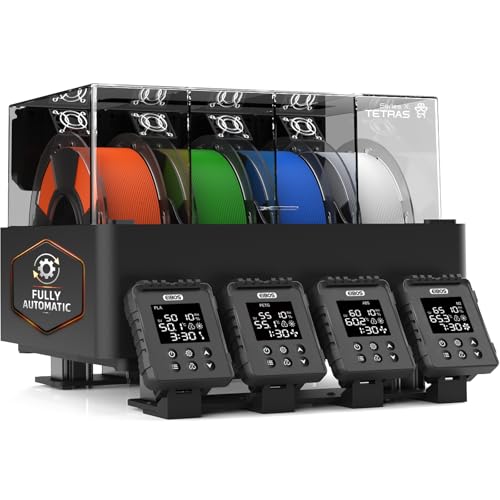
3. If drying is the only reason you were upgrading
EIBOS Tetras
Active drying that reuses the AMS you already own. Cheaper than the 2 Pro upgrade if color is not the problem you are solving.
A good share of AMS 2 Pro upgrades are really drying upgrades. If you already have an original AMS and four colors works fine, the thing you are chasing is the active drying — and that is purchasable separately.
The cited dryer roundup positions the Tetras as the option for Bambu Lab AMS owners, with active drying that reuses the unit you own, and the registry notes it is cheaper than an AMS 2 Pro upgrade when drying is the only motivation.
Verify fitment for your exact AMS before ordering — the registry flags that its whole value proposition depends on that compatibility. The AMS mods worth buying puts it next to the alternatives.
What it gets right
- Built around the fact that you already own an AMS, rather than asking you to replace it
- Active drying while the AMS feeds the printer closes the gap between drying and printing
- Cheaper than an AMS 2 Pro upgrade if drying is the only reason you were considering one
What it does not
- Its whole value proposition depends on you owning a compatible AMS — verify fitment for your exact unit
- If you do not have an AMS, a plain four-spool dryer is simpler and cheaper
- More parts in the filament path is more places for a feed problem to start
| Positioning (cited) | Best for Bambu Lab AMS owners |
|---|---|
| Approach (cited) | Active drying that reuses the AMS you own |
Questions people actually ask
Which printers is the AMS 2 Pro compatible with?
The 3DJake AMS 2 Pro Upgrade Kit listing, retrieved 17 October 2026, gives the compatibility as Bambu Lab P1P, P1S, X1C and X1E. The A1 and A1 mini are not on that list and take the AMS Lite instead - the registry records the A-series as incompatible with the P-series and X-series AMS units in both directions.
What is the filament buffer in the AMS 2 Pro upgrade kit for?
It manages slack. The buffer holds a small loop of filament between the AMS and the printer so the extruder can retract and load without fighting the unit's feed motor down a long PTFE tube. It is included in the single-unit kit variant rather than sold separately, so do not leave it out of the installation.
Which AMS 2 Pro upgrade kit do I need?
The 3DJake listing states the kit with the Filament Buffer is for connecting only one AMS 2 Pro, and that connecting multiple AMS 2 Pro units requires the kit with hub for the serial connection. One unit means the buffer kit; several units mean the hub kit. Ordering the wrong one means ordering twice.
Can I use an AMS 2 Pro with an A1 or A1 mini?
No. The A-series takes the AMS Lite, and no kit variant or adapter changes that. The registry records the incompatibility from both sides - the P/X-series AMS units are not compatible with the A1 series, and the AMS Lite is not compatible with the P-series or X-series.
Do I need the upgrade kit if I buy an AMS 2 Pro?
If your printer did not ship with an AMS connection, yes. The kit carries the Bambu Bus Cable (4-pin), the AMS 2 Pro Switching Adapter, PTFE tube couplers and tubes, and the official store page records the switching adapter as the requirement for drying. Without it you can end up with a filament changer rather than the dryer you were buying.
Does the AMS 2 Pro dry filament on its own?
Active filament drying is the unit's headline feature per the registry, but on an upgraded printer it depends on the kit: the official Bambu Lab store page records the AMS 2 Pro Switching Adapter as the requirement for drying. Buy the unit and the correct kit together.
Sources
- AMS 2 Pro Upgrade Kit printer compatibility (P1P, P1S, X1C, X1E), the Filament Buffer included in the single-unit kit, and the statement that connecting multiple AMS 2 Pro units requires the kit with hub for serial connection - 3DJake AMS 2 Pro Upgrade Kit listing, retrieved 2026-10-17
- AMS 2 Pro Upgrade Kit contents (Bambu Bus Cable 4-pin, AMS 2 Pro Switching Adapter, PTFE tube couplers and tubes), the two kit variants and the switching-adapter requirement for drying - official Bambu Lab store product page, retrieved 2026-10-06
- AMS, AMS Lite, AMS 2 Pro and AMS HT descriptions and capabilities - Wikipedia, retrieved 2026-10-17
- AMS unit capabilities, dryer specifications and third-party fitment rows come from this site's product registry, whose spec provenance is documented in content/products.ts - no figure is asserted that a manufacturer or a cited third party did not publish
Read this next
- The AMS 2 Pro upgrade kit, explainedThe published kit contents, the Filament Buffer versus AMS Hub choice, and the switching-adapter requirement that decides whether drying works.
- AMS 2 Pro vs AMS LiteThe AMS 2 Pro fits enclosed machines and the AMS Lite fits the A-series. What each does, and the gap you have to fill on an A1.
- Which AMS to use with a P1SWhich AMS fits a P1S, why the 2 Pro is the pick over the original, and what to plan for before it arrives.
- The AMS mods worth buyingThe faults worth paying to fix are moisture and desk sprawl. Everything else on the AMS mod lists is a printed bracket and should stay one.
- Bambu Lab AMS 2 ProWhy active drying makes the AMS 2 Pro a different product from the original AMS, and the case for buying it instead of a new printer.
- Which AMS works with an A1 miniThe AMS Lite is the only AMS that fits an A1 mini. Open air means no moisture protection, so the real budget is the unit plus a dryer plus somewhere to put it.