AMS & Color
The AMS mods worth buying
An AMS has two genuine weaknesses and a dozen imaginary ones. These are the purchases that fix the real faults, and the printed files that cover the rest.
By Michael W. · Published October 17, 2026
Some links here are Amazon affiliate links, so a purchase may earn this site a commission at no cost to you. It does not change what gets recommended or the order it appears in — how that works.
Quick picks
Tap any row to jump to the full write-up. Prices are read from Amazon and dated; stock is always whatever the listing says.
| # | Product | Best for | Price |
|---|---|---|---|
| 1 | 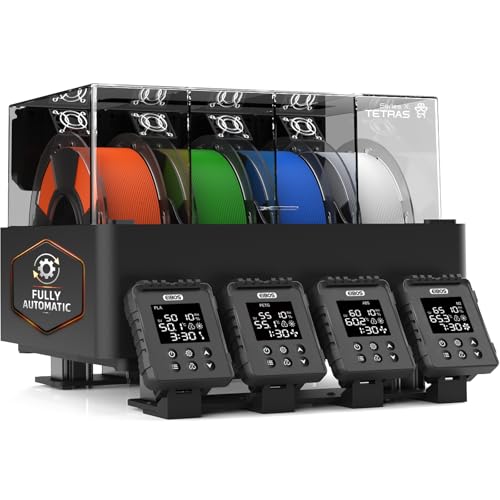 EIBOS Tetras Active drying built around the AMS you already own rather than asking you to replace it. This is the only mod that fixes the original AMS's real defect. | Best AMS mod overall AMS owners — active drying that works with the unit you already bought | |
| 2 |  BIQU Panda Stack An aluminum multi-layer rack for the A1 and A1 mini that supports a dual AMS setup. It solves the problem every AMS Lite owner actually has: desk area. | Best mod for an AMS Lite setup Getting an A1's spools, AMS Lite and accessories off the desk and onto a frame | $159.99 · View on Amazon #ad We earn a commission · price as of November 20, 2026 |
| 3 |  Polymaker PolyDryer Sealed per-spool storage with active drying, at a cited 10-20% RH. It fixes the filament on the shelf, which is where most moisture damage actually happens. | Best mod for the spools not in the AMS Sealed storage first, active drying second — the per-spool approach | |
| 4 | Bambu Lab AMS 2 Pro Four spools with active drying, humidity monitoring and RFID logging. If you were going to spend repeatedly modding an older AMS, this is the honest comparison. | The mod that is really a replacement The single best upgrade for a P1S or X1C owner who is tempted by a new printer | Check price on Amazon #ad We earn a commission · price as of November 20, 2026 |
The short answer
An AMS has two faults worth paying to fix: moisture and sprawl. On the original AMS, the registry's own note is that it monitors humidity without doing anything about it. On an AMS Lite, the spools sit in open air. Everything else people mod is preference.
The best buy is active drying that reuses the unit you own. The EIBOS Tetras is positioned exactly there in the cited dryer roundup — cheaper than replacing the AMS, and it closes the gap between drying and printing.
Print the brackets, buy the physics. Risers, spool guides, tube clips and desiccant trays are free files and should stay that way. Drying hardware and a rigid rack are the two things a printed part cannot be.
What an AMS actually gets wrong
Before buying anything, it helps to separate the AMS's design limits from the things people complain about on forums. There are three real limits and they are all documented in the registry's own product entries.
The first is moisture, and which form it takes depends on your unit. The original AMS is a sealed enclosure with humidity monitoring and no drying, so it reports the problem and lets it continue. The AMS Lite has no enclosure at all — the registry calls out zero moisture protection, with filament exposed between prints. Only the AMS 2 Pro and the AMS HT dry actively.
The second is purge waste. Four-color printing wastes filament on every tool change, and the purge tower is real and not small. No mod fixes that, because it is a consequence of one hotend serving four materials.
The third is space. The registry notes that an AMS 2 Pro needs the space beside or above the printer that your shelf may not have, and that an A1 plus AMS Lite takes over a desk. That one a rack genuinely solves.
| Your unit | Its real weakness | The fix worth money |
|---|---|---|
| AMS (original) | Humidity monitoring with no drying — a wet spool loaded here stays wet | Active drying that reuses the unit, or step up to the 2 Pro |
| AMS Lite (A1, A1 mini) | No enclosure at all — zero moisture protection between prints | Sealed per-spool storage, plus a rack to recover the desk |
| AMS 2 Pro | Space, and purge waste on every tool change | Nothing. Shelf planning, not hardware |
| AMS HT | One spool — wrong unit entirely if multicolor is the goal | Nothing. Add a four-spool unit alongside it if you need color |
The mods to print, not buy
A large share of what gets called an AMS mod is a printed part, and buying one is spending money to avoid an evening. Spool-edge guides, PTFE tube clips, desiccant trays that drop into the unit, riser feet, and brackets that hang the AMS above the printer are all files. Print them in PETG if they sit anywhere warm.
Two caveats worth stating. Anything load-bearing — a shelf carrying four loaded spools — is where a printed part is the wrong answer and a metal rack is the right one, which is why the Panda Stack is a pick above and a printed riser is not. And anything that changes the filament path geometry can create feed faults that are hard to diagnose later. Printed versus bought upgrades draws that line properly.
Mods that are not worth doing
Chaining more units than you will use
The registry notes that multiple original AMS units can be chained for more than four materials. The capability is real; the use case usually is not. Eight-color prints purge twice as much filament and take far longer, and most multi-material work is two or three materials with a lot of one of them.
Desiccant without sealing
Dropping desiccant into an AMS Lite is the commonest mod suggestion and the least effective, because the unit is open to the room. Desiccant in an unsealed volume is dehumidifying your house. In a sealed AMS or a sealed box it works, and that is where it belongs.
Running TPU through a unit that will not take it
This comes up as a modification question — smoother tube routing, shorter paths — and it is better treated as a compatibility question with a real answer. Running TPU through an AMS covers which units manage it and what actually goes wrong.
Modding your way around not owning one
Every mod on this page assumes you have an AMS and are keeping it. If you are still deciding whether to buy one at all, that is a different page: AMS alternatives covers the third-party four-spool unit, the dryer-based routes and the honest point at which none of them substitutes for the first-party system.
What this page is and is not based on
AMS unit capabilities and limits, third-party fitment, the Panda Stack's material and supported setups, and the PolyDryer's cited 10-20% RH figure are registry spec rows whose provenance is documented in content/products.ts. The EIBOS Tetras positioning comes from the cited dryer roundup. Nothing on this page was measured here, no mod listed above was fitted and tested on a bench, and how we review says so. No price appears in prose and no humidity, drying-time or purge figure is asserted beyond the cited ones.
Every pick in full
1. Best AMS mod overall
EIBOS Tetras
Active drying built around the AMS you already own rather than asking you to replace it. This is the only mod that fixes the original AMS's real defect.
The original AMS has one real engineering fault and this is the mod that addresses it. The registry records the problem in the unit's own entry: it monitors humidity, it does not do anything about it — a wet spool loaded there stays wet. Monitoring a fault is not fixing it.
The Tetras is positioned, in the cited dryer roundup, as the best option for Bambu Lab AMS owners specifically, with active drying that reuses the AMS you already own. That last clause is the whole pitch. The alternative route to active drying is replacing the unit with an AMS 2 Pro, and the registry notes the Tetras is cheaper than that upgrade if drying is the only reason you were considering one.
Two honest cautions. Its entire value proposition depends on you owning a compatible AMS, so verify fitment against your exact unit before ordering. And more parts in the filament path is more places for a feed problem to start — AMS not loading filament is the page for when that happens.
What it gets right
- Built around the fact that you already own an AMS, rather than asking you to replace it
- Active drying while the AMS feeds the printer closes the gap between drying and printing
- Cheaper than an AMS 2 Pro upgrade if drying is the only reason you were considering one
What it does not
- Its whole value proposition depends on you owning a compatible AMS — verify fitment for your exact unit
- If you do not have an AMS, a plain four-spool dryer is simpler and cheaper
- More parts in the filament path is more places for a feed problem to start
| Positioning (cited) | Best for Bambu Lab AMS owners |
|---|---|
| Approach (cited) | Active drying that reuses the AMS you own |
#ad We earn a commission · price as of November 20, 2026
2. Best mod for an AMS Lite setup
BIQU Panda Stack
An aluminum multi-layer rack for the A1 and A1 mini that supports a dual AMS setup. It solves the problem every AMS Lite owner actually has: desk area.
An A1 with an AMS Lite takes over a desk, and the registry says so in as many words. Four spools sitting in open air beside the machine is a footprint problem before it is anything else, and vertical space is the only real fix.
The registry lists this as an aluminum-alloy multi-layer rack for the A1 and A1 mini, supporting a dual AMS and ViViD setup. Aluminum matters here rather than being a marketing word: it does not flex under four loaded spools the way a printed frame does, and a dual setup is exactly where the desk problem becomes genuinely unmanageable.
Be clear what you are buying. The registry is blunt — this is pure organization and it will not improve a single print, and a printed riser costs you filament and an evening instead of money. Buy it because your bench is unusable, not because you expect better prints. Which AMS works with an A1 mini covers the unit itself.
What it gets right
- An A1 with AMS Lite takes over a desk; a vertical rack is the only real fix
- Aluminum alloy, so it does not flex under four loaded spools the way a printed frame does
- Supports a dual setup, which is where the desk problem becomes genuinely unmanageable
What it does not
- Pure organization — it will not improve a single print
- A1 and A1 mini only
- A printed riser costs you filament and an evening instead of money
| Type | Aluminum alloy multi-layer rack |
|---|---|
| Fits | Bambu Lab A1 and A1 mini |
| Supports | Dual AMS and ViViD setup |
3. Best mod for the spools not in the AMS
Polymaker PolyDryer
Sealed per-spool storage with active drying, at a cited 10-20% RH. It fixes the filament on the shelf, which is where most moisture damage actually happens.
Every AMS mod list talks about the four spools in the unit and ignores the fifteen on the shelf. Those are the ones that go wet, because they sit in room air for weeks between prints while the loaded ones get used.
The registry lists the PolyDryer as a modular approach combining passive sealed storage with active drying, with a cited figure of 10-20% RH reached, bought as individual boxes. Prevention rather than repair: a spool that lives sealed never needs the eight hours of drying a spool that lived in a cupboard does.
The arithmetic has a limit, and the registry states it: buying enough boxes for a full shelf adds up past the price of a four-spool dryer, and per-box storage takes more total shelf area than a stacked rack. Filament dryer boxes compares the approaches, and how to tell if your filament is wet is how you find out whether you have the problem at all.
What it gets right
- The modular box system means every spool lives sealed, which prevents the problem instead of fixing it
- A cited 10-20% RH is the number that matters, and it is a good one
- Cheap to start with one box and add more, instead of one large purchase
What it does not
- Buying enough boxes for a full filament shelf adds up past the price of a four-spool dryer
- Standard-temperature drying — not an engineering-filament answer
- Per-box storage takes more total shelf area than a stacked rack
| Approach (cited) | Passive sealed storage plus active drying |
|---|---|
| Humidity reached (cited) | 10-20% RH |
| Entry point (cited) | From a per-box price, boxes bought individually |
Stock photograph of this product class, not of this specific unit.
#ad We earn a commission · price as of November 20, 2026
4. The mod that is really a replacement
Bambu Lab AMS 2 Pro
Four spools with active drying, humidity monitoring and RFID logging. If you were going to spend repeatedly modding an older AMS, this is the honest comparison.
At some point modding an older unit costs more than the unit that does not need modding, and this is where that line sits. The registry lists the AMS 2 Pro as a four-spool automatic material system whose headline feature is active filament drying, inheriting humidity monitoring and RFID logging from the original AMS.
The reason it belongs on a mods page is that it is the modification route for a P1S or X1C owner — it bolts onto the machine you own via the upgrade kit rather than requiring a new printer. The registry calls it the single best upgrade for a P1S or X1C owner who is tempted by a new machine, and that is the comparison that matters.
Costs, stated plainly: four-color printing wastes filament on every tool change and the purge tower is real and not small, and it needs the space beside or above the printer that your shelf may not have. AMS 2 Pro compatibility and the filament buffer covers which printers take it and which kit variant you need.
What it gets right
- Active drying means the spool you print from is the spool you dried — no transfer step, no re-absorption window
- Four colors on a machine you already own, for a fraction of a new printer
- RFID logging removes the single most common cause of a ruined multi-color print: the wrong material profile
What it does not
- Four-color printing wastes filament on every tool change; the purge tower is real and it is not small
- If you only print single-color PLA, you are buying a dryer with a filament changer attached
- Needs the space beside or above the printer that your shelf may not have
| Type | Four-spool automatic material system |
|---|---|
| Headline feature | Active filament drying |
| Inherits | Humidity monitoring and RFID logging from the original AMS |
Questions people actually ask
What are the best AMS mods for a Bambu Lab?
The ones that fix a real fault rather than a preference. Active drying that reuses the AMS you already own addresses the original unit's main defect - the registry notes it monitors humidity without doing anything about it. A rigid metal rack fixes the desk sprawl an AMS Lite creates. Sealed per-spool storage protects the spools that are not loaded. Everything else on most mod lists is a printed bracket.
Can you add drying to an original AMS?
Not by modifying the unit itself, but you can add active drying alongside it. The EIBOS Tetras is positioned in the cited dryer roundup specifically for Bambu Lab AMS owners, with active drying that reuses the AMS rather than replacing it, and the registry notes it is cheaper than an AMS 2 Pro upgrade if drying is the only reason you were considering one. Verify fitment for your exact unit first.
Is a printed AMS riser good enough?
For a single unit with light spools, usually. For four loaded spools or a dual setup it is the wrong answer - a printed frame flexes where an aluminum rack does not, and that flex is sitting directly above your printer. Print the tube clips, the spool guides and the desiccant trays; buy the thing that carries weight.
Does putting desiccant in an AMS Lite work?
Barely, because the AMS Lite has no enclosure - the registry describes it as open-air with zero moisture protection. Desiccant in an unsealed volume is dehumidifying the room. In a sealed original AMS or a sealed storage box it does real work, which is where it belongs.
Should I mod my AMS or buy an AMS 2 Pro?
Add up what you were going to spend. If the only fault you are fixing is drying, a dryer built for AMS owners is the cheaper route. If you are stacking two or three purchases onto an older unit, the AMS 2 Pro does it in one - the registry calls it the single best upgrade for a P1S or X1C owner tempted by a new printer. Check compatibility and which kit variant you need before ordering.
Sources
- AMS, AMS Lite, AMS 2 Pro and AMS HT descriptions and capabilities - Wikipedia, retrieved 2026-10-17
- AMS unit capabilities, dryer specifications and third-party fitment rows come from this site's product registry, whose spec provenance is documented in content/products.ts - no figure is asserted that a manufacturer or a cited third party did not publish
Read this next
- The best Bambu Lab AMS accessoriesWhich AMS to buy for your printer, plus the accessories that fix feeding problems and desk space - ranked by the problem each solves.
- AMS 2 Pro compatibility and the filament bufferListed for the P1P, P1S, X1C and X1E. One kit variant includes a filament buffer for a single unit; the other has a hub for chaining several.
- Which AMS works with an A1 miniThe AMS Lite is the only AMS that fits an A1 mini. Open air means no moisture protection, so the real budget is the unit plus a dryer plus somewhere to put it.
- Running TPU through an AMSWhy TPU buckles in an AMS path, what genuinely helps, and why direct feeding is the answer most Bambu owners arrive at.
- Printed vs bought upgradesThe rule that decides printed versus bought, the PLA-in-a-warm-chamber trap, and which parts must never be printed.
- Filament dryer boxesHow per-spool sealed boxes differ from four-spool dryers, the humidity figure that matters, and where the modular approach stops scaling.