Nozzles & Plates
Nozzle temperature malfunction
This error reads like a dead hotend and usually is not. It is a broken signal path, and three of the four causes cost nothing to rule out.
By Michael W. · Published October 11, 2026
The short answer
This is a signal problem far more often than a heater problem. The error the Bambu Lab forum thread records in full is HMS_0300_0200_0001_0007 — “The nozzle temperature is abnormal, the sensor may be open circuit”. Open circuit is the clue: the machine cannot read the temperature, which is not the same as the hotend being unable to reach it.
Check four things, in this order. Reseat the hotend connector. Confirm the silicone sock is fitted and positioned. Measure the thermistor — the thread gives above 90K ohms at room temperature as the expected reading. Then inspect the FPC ribbon cable between the extruder connection board and the TH board, which is what actually failed in that thread after two other parts had been suspected.
Three of those four cost nothing. Only buy a hotend once a measurement says the thermistor is dead, or once you have found damage on the ribbon.
What the error actually means
A hotend has two separate jobs: a heater cartridge that makes heat, and a thermistor that reports how much. The firmware watches the reported number and stops the print the moment it stops making sense — too low for the power going in, jumping around, or absent entirely.
That safety behaviour is why the error appears so suddenly and why it so often has nothing to do with heating. A thermistor whose signal path is broken reads as if the nozzle were at room temperature while the heater is running, and the firmware correctly refuses to continue. The wording the forum thread captures — “the sensor may be open circuit” — is the machine telling you it suspects a wire, not a heater.
The four causes, in the order to check them
| Check | What you are looking for | Cost |
|---|---|---|
| Hotend connector seating | The 20-pin hotend connector not fully home. Unplug and reseat it more than once | Free |
| Silicone sock | A missing or displaced sock, so the part-cooling fan is blowing directly on the nozzle | Free, or the price of a sock |
| Thermistor resistance | Above 90K ohms at room temperature is the expected reading in the cited thread | A multimeter you may already own |
| FPC ribbon cable | A tear or crease in the flat cable between the extruder connection board and the TH board | The cheapest part in this list |
| Wire routing | Thermistor wires pinched, or rubbing a sharp metal corner near the toolhead | Free |
| Print speed and flow | A machine asked for more melt than it can deliver, which reads as a temperature fault | Free - slow the profile and retest |
Why a missing silicone sock does this
The sock is insulation. Without it the part-cooling fan blows directly onto the heater block and the thermistor, and the reported temperature swings as the fan speed changes through the print. The firmware sees a number it cannot reconcile with the power it is delivering and stops.
The reason this is worth checking early is that it is both free and extremely common after any hotend work — a sock left off during a nozzle change, or pushed out of position while refitting the toolhead cover. The forum thread records exactly that pattern: with the cap correctly positioned, the nozzle temperature stayed stable.
How to measure the thermistor
What reading to expect
The thread gives above 90K ohms at room temperature as the expected resistance, measured across the thermistor pins at the hotend connector — it names pins 6, 7, 16 and 17 for the outer leg and 4, 5, 14 and 15 for the inner. An open circuit reads as no continuity at all, which is the failure the error message names.
What a measurement does not tell you
A good reading at the connector does not clear the cable between the toolhead and the mainboard, and a bad reading does not prove the thermistor is at fault rather than the path to it. That is why the order above goes connector, sock, thermistor, cable rather than straight to a part. Bambu Lab's own extruder procedure is the reference for getting at the connector safely.
When it is not the sensor at all
Two other patterns show up under the same symptom. The first is a machine being asked for more flow than it can melt: at very high speeds a hotend can fall behind, and the temperature it reports drifts below target until the firmware intervenes. Slowing the profile and retesting separates that from a hardware fault in one print.
The second is a partial clog. A blocked nozzle changes how heat moves through the block, and a clog plus a marginal connection produces an error that comes and goes. Clearing a clogged nozzle is the page for that, and print quality triage is where to go if the machine prints but badly.
What this page is and is not based on
The error string, the above-90K-ohm expected reading, the pin pairs and all four causes come from the Bambu Lab community forum thread cited below, retrieved 11 October 2026 — including the detail that the FPC cable was the actual fix after two other parts had been suspected. The thread also quotes part prices; those are deliberately not reproduced here, because a price we did not verify today is worse than no price. We have not reproduced this fault on a bench; there is no test lab here and how we review says so. Hotend fitment rows come from this site's registry, whose provenance is documented in content/products.ts.
What to buy

#ad We earn a commission · price as of October 10, 2026
1. The replacement, for a P1S, P1P or X1C
Bambu Lab Hotend with Hardened Steel Nozzle, 0.4 mm
A complete hotend assembly with a hardened steel nozzle, so a dead thermistor is a module swap rather than a soldering job.
If the thermistor itself has failed, the fix is a new hotend, and buying the complete assembly is the reason this is a ten-minute job instead of a soldering exercise. The registry lists this part for the P1S, P1P, X1C and X1 Carbon (model FAH001-N-1) as a complete hotend assembly with a hardened steel nozzle cited at HRA 74.
The hardened nozzle is a side benefit worth taking while you are in there: abrasive filament rounds a stainless nozzle off fast, and with the worst materials a single print can do it. If you were going to need one eventually, a failed hotend is the right moment.
Order it only after you have ruled out the free causes below, because a new hotend fitted to a torn ribbon cable fails in exactly the same way. Hotend replacement is the procedure.
What it gets right
- Abrasive filament rounds a stainless nozzle fast — with the worst materials, a single print can do it
- Comes as a complete assembly, so the swap is a module change rather than a nozzle extraction
- 0.4 mm keeps your existing print profiles valid
What it does not
- Hardened steel conducts heat slightly worse than stainless, so very high-flow PLA needs a small temperature bump
- Pointless if you only ever print plain PLA and PETG — stainless lasts for years on those
- P-series and X1 only; the A-series and H-series need their own part
| Nozzle | Hardened steel, 0.4 mm |
|---|---|
| Fits | P1S, P1P, X1C and X1 Carbon (model FAH001-N-1) |
| Hardness reference | Hardened steel is cited at HRA 74 |
| Supplied as | Complete hotend assembly |
#ad We earn a commission · price as of October 10, 2026
2. The replacement, for an A1 or A1 mini
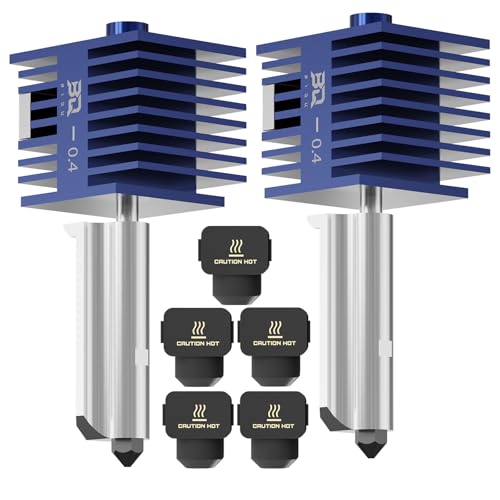
BIQU Panda Juicer SF 0.4 mm Hotend Kit
A 0.4 mm hardened steel hotend kit listed for the A-series, cheap enough to keep a spare on the shelf.
The A-series takes its own hotend, so a P1S part is not a substitute no matter how similar the error message looks. The registry lists this kit as 0.4 mm hardened steel at standard flow for the A1 and A1 mini.
Standard flow is what you want in a replacement rather than an upgrade: your existing profiles stay close to right, so you are fixing one problem rather than introducing a calibration project at the same time. A1 and A1 mini maintenance covers the rest of the A-series spares list.
What it gets right
- Hardened steel at 0.4 mm covers abrasive filament on the A-series, which the stock stainless nozzle does not
- Cheap enough to keep a spare on the shelf, which is the actual answer to a clog at 2 a.m.
- Standard flow means your existing profiles stay close to right
What it does not
- Standard flow, so it is not a speed upgrade — do not buy it expecting one
- A third-party hotend on a machine under warranty is a decision, not a free lunch
- A-series fitment only; it will not fit a P1S, and the H2 series takes a different Juicer variant
| Nozzle | 0.4 mm hardened steel |
|---|---|
| Fits | Bambu Lab A1 and A1 mini |
| Positioning | Standard flow, for daily printing and maintenance |
#ad We earn a commission · price as of October 10, 2026
3. If you are replacing it anyway
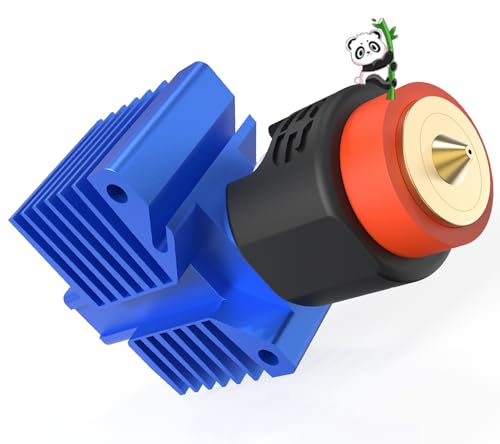
BIQU Panda Revo Hotend
An E3D Revo quick-change hotend for the P1S, P1P and X1C. Future nozzle changes stop being a hotend job.
A failed hotend is the one moment when changing systems costs you almost nothing extra, because you are already doing the work. The registry lists this hotend for the P1S, P1P and X1C with high-flow positioning, and Revo nozzles change by hand in seconds.
Two real costs: you are off the official hotend, which makes a support conversation harder, and flow calibration has to be redone. If the machine needs to be printing again immediately, fit the official assembly and consider this later. The nozzle roundup compares them properly.
What it gets right
- Revo nozzles change by hand in seconds — this is the single feature people buy a P2S for
- High-flow geometry is a genuine throughput gain on large single-color prints
- Turns nozzle diameter into a per-print choice instead of a maintenance decision
What it does not
- You are now off the official hotend, so a Bambu support conversation gets harder
- Revo nozzles cost more per nozzle than Bambu's own
- Flow calibration has to be redone; do not expect your old profiles to be exactly right
| System | E3D Revo quick-change nozzle |
|---|---|
| Fits | Bambu Lab P1S, P1P and X1C |
| Positioning | High-flow, high-speed |
Questions people actually ask
What does the Bambu Lab nozzle temperature malfunction error mean?
That the printer cannot read the nozzle temperature reliably, which is not the same as the hotend failing to heat. The error string recorded in the cited forum thread is HMS_0300_0200_0001_0007, "The nozzle temperature is abnormal, the sensor may be open circuit" - and open circuit points at a broken signal path rather than a dead heater.
How do I fix the nozzle temperature is abnormal error?
Work through four checks in order. Unplug and reseat the hotend connector, more than once. Confirm the silicone sock is fitted and in position so the part-cooling fan is not blowing on the thermistor. Measure the thermistor - the cited thread gives above 90K ohms at room temperature as the expected reading. Then inspect the FPC ribbon cable between the extruder connection board and the TH board for a tear. Three of those four cost nothing.
What resistance should a Bambu Lab thermistor read?
Above 90K ohms at room temperature, according to the forum thread this page cites, measured across the thermistor pins at the hotend connector. That thread names pins 6, 7, 16 and 17 for the outer leg and 4, 5, 14 and 15 for the inner. An open circuit reads as no continuity at all, which is the specific fault the error names.
Can a missing silicone sock cause a nozzle temperature error?
Yes, and it is one of the commonest causes after any hotend work. Without the sock the part-cooling fan blows directly on the heater block and thermistor, so the reported temperature swings as fan speed changes and the firmware stops the print. The cited thread records that with the cap correctly positioned the temperature stayed stable.
Do I need to replace the whole hotend?
Only once a measurement says the thermistor is dead, or once you have found damage on the ribbon cable. In the thread this page cites, the owner replaced the thermistor and heater module and it did not help - a torn FPC cable was the real fault. If you do replace the hotend, buy the assembly listed for your exact machine: the P1S, P1P and X1C take one part, the A1 and A1 mini another, and the H2 series another again.
Can printing too fast cause a nozzle temperature malfunction?
It can produce the same symptom. A hotend asked for more melt than it can deliver reports a temperature drifting below target until the firmware intervenes. Slowing the profile and reprinting separates that from a hardware fault in a single test, which is why it is worth trying before ordering parts.
Sources
- Error string HMS_0300_0200_0001_0007 "The nozzle temperature is abnormal, the sensor may be open circuit", the above-90K-ohm room-temperature thermistor reading, the thermistor pin pairs, and the three causes worked through (poorly seated hotend connector, faulty thermistor, torn TH Board FPC cable) - Bambu Lab community forum thread, retrieved 2026-10-11
- P1S extruder and hotend service procedure, including connector access - Bambu Lab wiki, retrieved 2026-10-11
- Hotend fitment and material rows are registry spec rows; provenance for each is documented in content/products.ts
Read this next
- Replacing a Bambu Lab hotendHow the complete-assembly hotend format works, the replacement procedure, what the silicone sock does, and the fitment rule to check first.
- Clearing a clogged nozzleThe procedure for clearing a clog, plus the four causes behind it - because clearing without diagnosing gets you a repeat.
- The Bambu Lab hardened steel nozzleWhat hardened steel at HRA 74 is for, which filaments require it, and why the complete-assembly format matters for fitting it.
- The best nozzles and hotends for a Bambu LabHardened steel, quick-change or a second diameter - which nozzle upgrade matches your filament and your machine, with who each is wrong for.
- Print quality triageThe central symptom-to-cause table for the whole site, with the two free checks that resolve most problems before any purchase.
- A1 and A1 mini maintenanceA-series wear parts differ from the P-series: a different hotend, an exposed bed, open-air filament. Three parts worth stocking, and the free jobs that matter more.