Upgrades
The best cooling upgrades for a Bambu Lab printer
More air is not automatically better air. On an enclosed machine extra airflow fights the chamber heat ABS needs - so the upgrade that works is usually the one that reshapes the air at the nozzle, not the one that moves more of it.
By Michael W. · Published November 22, 2026
Some links here are Amazon affiliate links, so a purchase may earn this site a commission at no cost to you. It does not change what gets recommended or the order it appears in — how that works.
Quick picks
Tap any row to jump to the full write-up. Prices are read from Amazon and dated; stock is always whatever the listing says.
| # | Product | Best for | Price |
|---|---|---|---|
| 1 |  BIQU Panda Jetpack Printhead Cover + Cooling Fan Duct A nylon printhead cover with an integrated duct that reshapes the air at the nozzle - a geometry fix for curling overhangs that slicer settings alone often cannot reach. | Best overall cooling upgrade - and the budget pick Overhangs and bridges that curl no matter what you do in the slicer | |
| 2 |  BIQU Panda Turbo Cooling Fan A brushless turbo fan with adjustable airflow and magnetic plug-and-play mounting - a five-minute install with nothing to rewire. | Best if you want more auxiliary airflow on a P1S or X1C More auxiliary airflow on a P1S, fitted without a wiring job | $99.99 · View on Amazon #ad We earn a commission · price as of November 23, 2026 |
| 3 | 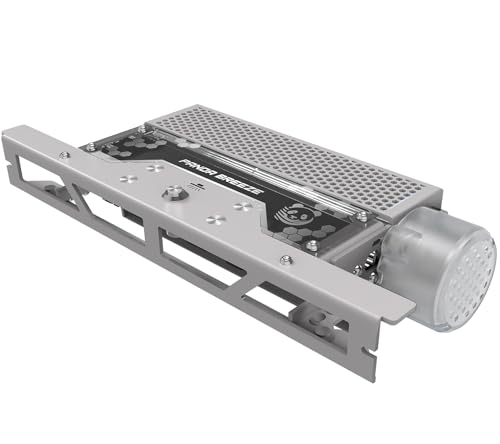 BIQU Panda Breeze Cross Flow Fan A high-flow cross-flow fan with an integrated LED, plug-and-play on the A-series - and the light is the part you will use most. | Best cooling upgrade for an A1 or A1 mini The A1 equivalent of the auxiliary-cooling upgrade, with a light built in | $82.99 · View on Amazon #ad We earn a commission · price as of November 23, 2026 |
| 4 |  BIQU Panda Touch + Panda Sense Kit A screen bundled with a chamber temperature and humidity sensor - the only part here that tells you what the air inside the machine is actually doing. | Best way to find out whether cooling is your problem at all Adding a screen and chamber temperature and humidity readings in one purchase |
Buy the nylon Jetpack printhead cover and duct first. It is the cheapest part here and the only one that fixes curling overhangs by changing the shape of the air at the nozzle rather than the volume of it — which is the fault most people are actually trying to fix, and the one slicer settings struggle with. It is the budget pick as well as the top pick, which is the honest ranking rather than a convenient one. If you genuinely want more auxiliary airflow on a P1S or X1C, the Panda Turbo fan is magnetic plug-and-play with adjustable flow. On an A1, the Breeze cross-flow fan is the only fitment that works.
And before you buy any of them: more cooling is not automatically better. On an enclosed machine, extra airflow fights the chamber heat ABS and ASA need, and the result is layer splitting rather than cleaner overhangs. If you do not know what your chamber is doing, the Panda Touch and Sense bundle is the part that tells you — and chamber humidity explains more mystery failures than airflow does.
What cooling actually controls
Part cooling does one job: it freezes extruded plastic before gravity has time to pull it out of shape. That is the whole mechanism, and it explains both why cooling fixes some faults completely and why it makes others worse.
What more cooling fixes
Curling and drooping on overhangs, where plastic is being laid over air. Sagging on bridges. Blobbing and deformation on small features and fine detail, where successive layers land on plastic that has not set. All three are PLA and PETG faults, and all three respond to airflow at the nozzle.
What more cooling breaks
Layer adhesion on ABS and ASA. Those materials need to cool slowly and evenly or they split along layer lines and lift at the corners, which is why Bambu publishes a 90-100 C bed for them — the hottest on its table — and why enclosed machines exist at all. Cooling an ABS print harder is working directly against the shrinkage mechanism. Fit a cooling upgrade on a machine that mostly prints ABS and you will spend your time turning it down.
What cooling does not touch
Stringing, popping, rough surfaces and random under-extrusion. Those are usually moisture or a worn feed path, and no fan fixes either — wet filament symptoms tells them apart, and print quality issues is the full diagnostic order.
Shape the air, or move more of it?
This is the decision the category comes down to, and it is worth being deliberate about because the two answers cost different amounts and solve different things.
Shaping the air means a duct: the same fan, the same volume, aimed better. It is cheap, it is the right answer for overhang curl specifically, and it does not add heat extraction you then have to fight on ABS. The cost is that it invalidates your tuned profiles, because the airflow your calibration assumed has changed.
Moving more air means an auxiliary fan: more total extraction, adjustable, and genuinely useful on large fast PLA prints where the part is outrunning the cooling. The cost is that an enclosed chamber is a heat budget, and you are now spending from it.
A third option worth knowing: on a P1S or X1C you run fast, part of what reads as a cooling problem is ringing from toolhead mass rather than hot plastic. The P1S mods page covers the aluminum extruder housing that addresses that, and it is a different fault with a similar-looking result.
The four parts, side by side
| Part | What it changes | Fits | Install | Fault it targets |
|---|---|---|---|---|
| BIQU Panda Jetpack cover + duct | Shape of the air at the nozzle | P1/X1 series; Panda Revo and Flow hotends | Printhead cover swap | Curling overhangs and sagging bridges |
| BIQU Panda Turbo fan | Total auxiliary airflow, adjustable | Bambu Lab X1 and P1 | Magnetic, plug-and-play | Large fast PLA prints outrunning the cooling |
| BIQU Panda Breeze cross-flow fan | Directed airflow, plus a work light | Bambu Lab A1 | Plug-and-play | Overhangs on tall A1 parts; first-layer visibility |
| BIQU Panda Touch + Sense kit | Nothing - it measures chamber temperature and humidity | P1P, P1S, X1C, X1E, A1 mini | Screen bracket plus sensor | Not knowing which fault you have |
Who should buy what
Your overhangs curl on PLA or PETG, on a P1S or X1C. The Jetpack cover and duct. Re-test overhangs after fitting, because your profiles assumed different air.
You print large, fast PLA and want more extraction. The Turbo fan, for the adjustable flow and the magnetic mount.
You own an A1 or A1 mini. The Breeze fan, mainly for the light, with modest expectations about the airflow.
You mostly print ABS or ASA. Buy none of the fans. You want chamber heat retained, not extracted — read enclosure temperature instead.
You do not know which fault you have. The Touch and Sense bundle, then come back. It is the cheapest way to stop buying parts speculatively.
What this page is and is not based on
Part types, materials, fitment lists and install methods are the vendors' own published figures held in this site's registry, cross-referenced against the cited BIQU Panda upgrade guide; anything the vendor states as a benefit is labeled as a vendor claim. The P1S auxiliary cooling fan and air filter are its published specification from the cited retailer listing, retrieved 11 October 2026. The 90-100 C ABS and ASA bed range is Bambu's own published figure for the textured PEI plate, retrieved 6 October 2026. No airflow figure, noise figure or temperature has been measured by this site, no part here has been fitted here, and no before-and-after print comparison was run here. See how we review.
Every pick in full
1. Best overall cooling upgrade - and the budget pick
BIQU Panda Jetpack Printhead Cover + Cooling Fan Duct
A nylon printhead cover with an integrated duct that reshapes the air at the nozzle - a geometry fix for curling overhangs that slicer settings alone often cannot reach.
Buy this one first, and it is also the cheapest part on the page, which is the happy case. It is a printhead front cover with an integrated cooling fan duct, in nylon, with listed fitment for the Bambu Lab P1 and X1 series and for the Panda Revo and Flow hotends, and it targets nozzle-area airflow, bridges and overhangs.
The reason it leads is mechanical. A curling overhang is not usually starved of air; the air is arriving in the wrong place. Reshaping the flow at the nozzle is a geometry fix, and geometry is the thing you cannot type into a slicer — which is why this addresses a fault that fan-speed settings alone often will not. The material choice matters too: nylon tolerates chamber heat far better than a printed PLA duct, and a printed duct in a warm P1S chamber is a part that slowly deforms into a different part.
Honest cons, and the first is important enough to be a reason not to buy it. More cooling on ABS and ASA causes layer splitting: those materials want to cool slowly, and on an enclosed machine you are trying to keep heat in, not take it out. Changing airflow also invalidates your tuned profiles, so re-test overhangs after fitting. And it is P1/X1 fitment only.
What it gets right
- Reshaping the air at the nozzle is a real geometry fix for curling overhangs
- Nylon tolerates chamber heat far better than a printed PLA duct would
- Cheap, and it addresses a fault that slicer settings alone often cannot
What it does not
- More cooling on ABS and ASA causes layer splitting — this helps PLA and PETG, and can hurt the others
- Changing airflow invalidates your tuned profiles; re-test overhangs after fitting
- P1/X1 fitment only, and the listing pairs it with the Panda Revo and Flow hotends
| Type | Printhead front cover with an integrated cooling fan duct |
|---|---|
| Material | Nylon |
| Fits | Bambu Lab P1/X1 series, and the Panda Revo and Flow hotends |
| Targets | Nozzle-area airflow, bridges, overhangs |
#ad We earn a commission · price as of November 23, 2026
2. Best if you want more auxiliary airflow on a P1S or X1C
BIQU Panda Turbo Cooling Fan
A brushless turbo fan with adjustable airflow and magnetic plug-and-play mounting - a five-minute install with nothing to rewire.
If the honest problem is that you want more air and not differently-shaped air, this is the part. It is a brushless turbo fan with adjustable airflow, listed for Bambu Lab X1 and P1 printers, with plug-and-play magnetic mounting and RGB lighting.
Two things make it a good buy rather than a novelty. The magnetic plug-and-play mounting means this is genuinely a five-minute upgrade with nothing to rewire, which is unusual in this category and matters because most people will fit it once and never revisit it. And adjustable airflow is the feature that saves it on an enclosed machine: the right amount of cooling is material-dependent, so a fan you can turn down is a fan you can keep fitted when you switch to ABS. Being brushless, it should also outlast the sleeve-bearing fan it supplements.
Honest cons. More airflow in an enclosed chamber fights the chamber heat you need for ABS and ASA, which is the same warning as the duct above and applies more strongly to a fan that moves more air. RGB lighting on a printer is a taste rather than a feature. And if your overhangs are already clean, this is a solution looking for a problem — the P1S already ships with an auxiliary cooling fan, which is part of what separates it from a P1P.
What it gets right
- Magnetic plug-and-play means this is a five-minute upgrade with nothing to rewire
- Adjustable airflow matters, because the right amount of cooling is material-dependent
- Brushless, so it should outlast the sleeve-bearing fan it supplements
What it does not
- More airflow in an enclosed chamber fights the chamber heat you need for ABS and ASA
- RGB lighting on a printer is a taste, not a feature
- If your overhangs are already clean, extra cooling is a solution without a problem
| Type | Brushless turbo fan with adjustable airflow |
|---|---|
| Fits | Bambu Lab X1 and P1 printers |
| Install | Plug-and-play magnetic mounting |
| Extras | RGB lighting |
#ad We earn a commission · price as of November 23, 2026
3. Best cooling upgrade for an A1 or A1 mini
BIQU Panda Breeze Cross Flow Fan
A high-flow cross-flow fan with an integrated LED, plug-and-play on the A-series - and the light is the part you will use most.
The A-series equivalent, and the page would be incomplete without it because every other airflow part here is P1/X1 fitment only. It is a high-flow cross-flow cooling fan with an LED light, listed for Bambu Lab A1 printers, plug-and-play on a machine that is easy to work on anyway.
Be realistic about the airflow gain and generous about the light. An A1 is open-frame and cools well already — it has the least to gain from more cooling of any machine in the lineup — so what extra directed flow mostly buys is cleaner overhangs on tall parts, where the top of the print has been sitting in still air. The integrated light, on the other hand, genuinely helps a first-layer check on an open machine, and it is the feature A1 owners tend to report actually using.
Honest cons, plainly. The gain is marginal on PLA, which is what most A1 owners print. It is A1 fitment only. And if your A1 prints are failing rather than merely imperfect, the cause is far more likely to be moisture than airflow — A1 and A1 mini mods puts this in order against the other upgrades for that machine.
What it gets right
- An A1 is open-frame and cools well already, so extra directed flow mostly shows up as cleaner overhangs on tall parts
- The integrated light genuinely helps a first-layer check on an open machine
- Plug-and-play on a machine that is easy to work on anyway
What it does not
- An open-frame A1 has the least to gain from more cooling of any machine in the lineup
- A1 fitment only
- Marginal on PLA, which is what most A1 owners print
| Type | High-flow cross-flow cooling fan with an LED light |
|---|---|
| Fits | Bambu Lab A1 printers |
| Install | Plug-and-play |
4. Best way to find out whether cooling is your problem at all
BIQU Panda Touch + Panda Sense Kit
A screen bundled with a chamber temperature and humidity sensor - the only part here that tells you what the air inside the machine is actually doing.
The odd one out, and arguably the smartest purchase on the page. Every other part here changes the air; this one measures it. It is a wireless touchscreen bundled with a temperature and humidity sensor, with listed fitment for the Bambu Lab P1P, P1S, X1C, X1E and A1 mini.
Why it belongs on a cooling page: nothing stock on these machines reports chamber temperature or chamber humidity, and those two numbers separate three faults that look identical on a finished part. Curling overhangs point at airflow. A chamber running cold points at the room, not the fan. And chamber humidity is the number that explains most mystery print failures — the stringing, popping and rough surfaces people routinely try to fix with cooling. Bought as a bundle it costs less than the two parts separately, which is the practical reason to take this route rather than buying a bare screen now and a sensor later.
Honest cons, and the first is about availability. At the last price check this bundle's listing showed no buyable offer, so its button reads “Check price on Amazon” rather than a figure — which is why it sits last here rather than first. If you only want a screen, the bare Panda Touch is cheaper and was carrying a live price at the same check. Third-party firmware sitting between you and the printer can lag behind a Bambu firmware update — see firmware updates. And a reading you do not act on is a number on a screen; the point is to stop guessing, not to have a graph.
What it gets right
- The sensor answers the question the screen alone cannot: what the chamber is actually doing
- Chamber humidity is the number that explains most mystery print failures, and nothing stock reports it
- Bought together it costs less than the two parts separately
What it does not
- If you only want a screen, the Panda Touch on its own is the cheaper buy
- Still a quality-of-life upgrade — knowing the humidity does not dry the filament for you
- Check the compatibility list against your exact printer before ordering
| Type | Wireless touchscreen bundled with a temperature and humidity sensor |
|---|---|
| Fits | Bambu Lab P1P, P1S, X1C, X1E and A1 mini |
Questions people actually ask
What is the best cooling upgrade for a Bambu Lab printer?
The BIQU Panda Jetpack printhead cover with its integrated nylon duct, for a P1S or X1C. It is the cheapest part in the category and it fixes curling overhangs by changing the shape of the air at the nozzle rather than the volume of it, which is the fault most people are actually trying to solve and the one slicer settings struggle with.
Will more cooling improve my prints?
On PLA and PETG, often yes - it fixes curling overhangs, sagging bridges and blobbing on small features. On ABS and ASA it makes things worse, because those materials need to cool slowly and extra airflow causes layer splitting and corner lift. On an enclosed machine, more cooling spends the chamber heat you are trying to keep.
Does the P1S already have an auxiliary cooling fan?
Yes. The enclosure, the auxiliary cooling fan and the air filter are the three things the P1S adds over the open-frame P1P, per its published specification. That is worth knowing before buying another fan: the upgrade that usually helps a P1S is a better duct rather than more air.
What is the best cooling upgrade for an A1?
The BIQU Panda Breeze cross-flow fan, because it is the only airflow part in this category with A1 fitment - the others are P1 and X1 only. Keep expectations modest on the airflow: an open-frame A1 already cools well, so the gain shows up mainly on tall parts, and the integrated light is the feature owners report using most.
Why do my overhangs still curl after turning the fan to 100%?
Because the problem is usually where the air arrives, not how much of it there is. A duct aims the existing airflow at the nozzle region instead of past it, which is a geometry fix you cannot type into a slicer. The two free things to try first are slowing the outer wall over the overhang and checking that the existing fans are clean and unobstructed.
Can a cooling upgrade hurt ABS printing?
Yes, directly. ABS and ASA split along layer lines and lift at the corners when cooled unevenly, which is the entire reason enclosed machines and 90-100 C beds exist for them. If ABS is most of what you print, skip the fans and spend the money on chamber heat retention instead.
Is a printed fan duct as good as a bought one?
The design might be, but the material usually is not. A duct printed in PLA sits next to the hotend inside a warm chamber and slowly deforms into a different shape, which quietly undoes the geometry you were buying. The nylon part here tolerates chamber heat, which is the main argument for buying rather than printing this particular upgrade.
Do I need a chamber sensor?
You need it more than you need another fan if you do not know which fault you have. Nothing stock on these machines reports chamber temperature or humidity, and those two numbers separate airflow problems from a cold room and from wet filament - which is the single most common cause of failures people try to fix with cooling.
Sources
- BIQU Panda hotends, build plates, fans, extruder parts and AMS accessories, with per-part fitment lists - OpenELAB upgrade guide
- P1S build volume (256 x 256 x 256 mm), 300 C nozzle and 100 C bed, with the enclosure, auxiliary cooling fan and air filter as the differences over the P1P - Makerpoint P1S listing, retrieved 2026-10-11
- Bambu Textured PEI Plate recommended heatbed temperatures per material: PLA 45-60 C, PETG 60-80 C, ABS and ASA 90-100 C, TPU 35-45 C - official Bambu Lab store product page, retrieved 2026-10-06
- Part types, materials, fitment lists, install methods and the vendors' own stated benefits for every upgrade on these pages come from this site's product registry, whose spec provenance is documented in content/products.ts - a vendor claim is labeled as a claim, and no figure is asserted that a manufacturer or a cited third party did not publish
- Every price shown on a buy button on this page is the live Amazon figure for that listing, refreshed daily and stamped with the date it was checked; a listing with no buyable offer at the last check renders "Check price on Amazon". No price is typed into this copy - see lib/prices.ts
Read this next
- The best Bambu Lab upgradesUpgrades ranked by the problem each one solves, with the popular ones that fix nothing clearly marked as such.
- The best Bambu Lab upgrades under $200Quick-change nozzles, a vertical rack for an A1's spools, a chamber sensor, more airflow, and the hardened hotend that should be everyone's first purchase - all with live prices under $200 at the last check.
- P1S mods worth doingP1S modifications ordered by the problem each solves, with the popular ones that change nothing clearly marked.
- Print quality triageThe central symptom-to-cause table for the whole site, with the two free checks that resolve most problems before any purchase.
- Chamber temperature on a passive enclosureHow passive chamber heating works, the safe ways to raise it, the modifications to avoid, and when an actively heated machine is the real answer.
- A1 and A1 mini mods worth doingA-series mods ordered by the problem each solves, why P-series parts do not fit, and the two problems specific to an open machine.