Upgrades
The best Bambu Lab upgrades under $200
This is not a longer version of the cheap list. Two things become buyable in this band that are not available below it - hand-swappable nozzles, and a real answer to where four spools live - and both change how you use the machine.
By Michael W. · Published November 22, 2026
Some links here are Amazon affiliate links, so a purchase may earn this site a commission at no cost to you. It does not change what gets recommended or the order it appears in — how that works.
Quick picks
Tap any row to jump to the full write-up. Prices are read from Amazon and dated; stock is always whatever the listing says.
| # | Product | Best for | Price |
|---|---|---|---|
| 1 | 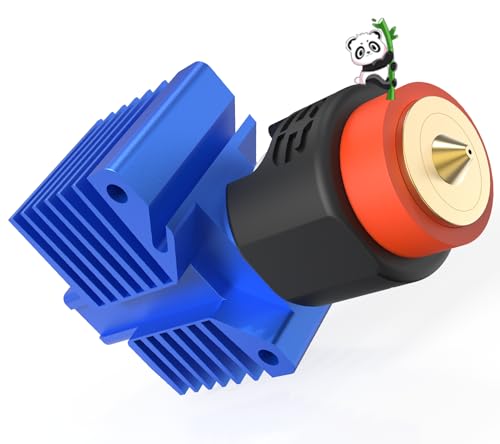 BIQU Panda Revo Hotend Quick-change nozzles by hand in seconds - the single feature people buy a whole new printer for, on the P1S they already own. | Best overall under $200 Getting quick nozzle changes on a P1S without buying a P2S | |
| 2 | 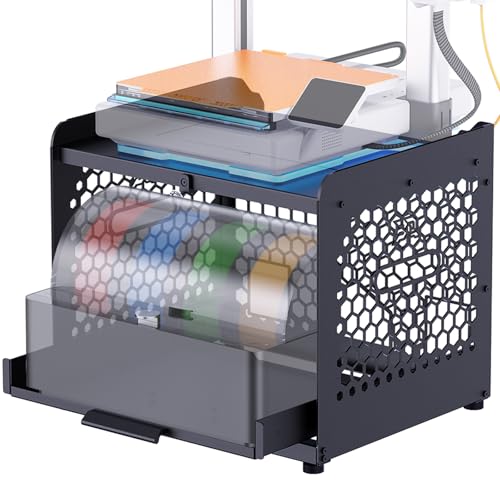 BIQU Panda Stack An aluminum multi-layer rack that gets an A1's spools, AMS Lite and accessories off the desk and onto a frame. | Best under $200 for an A1 or A1 mini Getting an A1's spools, AMS Lite and accessories off the desk and onto a frame | $159.99 · View on Amazon #ad We earn a commission · price as of November 23, 2026 |
| 3 |  BIQU Panda Touch + Panda Sense Kit A wireless touchscreen bundled with a chamber temperature and humidity sensor, for less than the two parts cost separately. | Best for finding out what your printer is actually doing Adding a screen and chamber temperature and humidity readings in one purchase | |
| 4 |  BIQU Panda Turbo Cooling Fan A brushless turbo fan with adjustable airflow and magnetic plug-and-play mounting for the P1 and X1 series. | Best airflow upgrade in the band More auxiliary airflow on a P1S, fitted without a wiring job | $99.99 · View on Amazon #ad We earn a commission · price as of November 23, 2026 |
| 5 |  Bambu Lab Hotend with Hardened Steel Nozzle, 0.4 mm A complete official 0.4 mm hardened steel hotend assembly that keeps every existing profile valid and covers abrasive filament. | Budget pick - the cheapest thing here, and the one to buy first The one purchase that has to happen before your first spool of anything carbon-filled | $21.98 · View on Amazon #ad We earn a commission · price as of November 23, 2026 |
Buy the BIQU Panda Revo quick-change hotend. It is the one upgrade in this band that changes how you use the printer rather than how well it does something it already does: nozzle diameter becomes a per-print choice instead of a maintenance job, which is the headline feature people buy an entire new machine for. On an A1 or A1 mini, the Panda Stack rack is the one instead — four spools in open air is the A-series problem and vertical is the only fix. The budget pick is the official hardened 0.4 mm hotend, the cheapest part here and the one almost everyone should buy before anything above it.
Why $200 and not $100: two of these cannot appear on a cheaper list at all. The quick-change hotend and the aluminum rack both sit above the $100 line, which is what makes this a different ranking rather than a longer one. Every pick here carried a live Amazon price under $200 at the last check, and each button shows the figure with the date it was read.
Why $200, and how the line is checked
The band comes from this site's own price layer rather than from a round number. On 22 November 2026, four registry upgrades carried a live Amazon price under $200 — clearing the three-product minimum this site requires before writing a price-band page — and, more importantly, two of them sit above the $100 line. That is the editorial test that matters: a price band is only worth a page if it contains something the cheaper band cannot.
One pick is the exception and is labeled as such on its card: the screen-and-sensor bundle showed no buyable offer at that check, so its button reads “Check price on Amazon” rather than a figure. It stays on the page because the argument for it is sound and the listing is real, and it sits below the two picks that do carry a price rather than above them.
Prices are read from Amazon daily and every button carries the date it was read. Nothing is typed into the copy, so if a part crosses the line after publication the button will say so before this sentence does. The cheap end of the same category is on the best upgrades under $100 and the best upgrades under $30; this page deliberately shares only one pick with either of them.
What $200 buys that $100 does not
Hand-swappable nozzles
Under $100 you can buy a better nozzle. Over it, you can buy a different relationship with nozzles: a quick-change system that makes 0.2 mm detail and 0.6 mm bulk a per-job decision. That is the single biggest behavioral change available for the money anywhere on this site, and the resolution-versus-throughput trade it unlocks is explained on nozzle sizes.
A real answer to where the spools live
The A-series multi-color setup puts four spools in open air above the printer. Under $100 the answer is a printed riser; over it, an aluminum rack that will not flex under load and supports a dual setup. AMS for an A1 mini covers the unit itself.
Both halves of the diagnostic problem at once
A bare screen is a cheap upgrade. A screen bundled with a chamber temperature and humidity sensor costs less than the two separately and answers a question nothing stock on the machine reports — which is how you stop buying parts speculatively.
The five upgrades, side by side
| Upgrade | What it changes | Fits | Depth of install | Buy it if |
|---|---|---|---|---|
| BIQU Panda Revo hotend | Nozzle diameter becomes a per-print choice | P1S, P1P, X1C | Hotend swap plus flow recalibration | You have ever wanted a P2S for the quick swap |
| BIQU Panda Stack | Where the spools and AMS Lite live | A1, A1 mini | Assembly, no printer teardown | An A1 Combo has taken over your desk |
| BIQU Panda Touch + Sense | What you can see - chamber temperature and humidity | P1P, P1S, X1C, X1E, A1 mini | Bracket plus sensor | You are guessing at the cause of failures |
| BIQU Panda Turbo fan | Total auxiliary airflow, adjustable | X1 and P1 series | Magnetic, five minutes | Overhangs curl on PLA or PETG |
| Bambu hardened hotend 0.4 mm | Abrasive filament becomes survivable | P1S, P1P, X1C, X1 Carbon | Module swap | Filled filament is on your shelf, or you have no spare |
Who should buy what
You own a P1S or X1C and change nozzle sizes reluctantly. The Revo quick-change hotend. Budget an evening for flow recalibration.
You own an A1 Combo. The Panda Stack. It will not improve a print and it will still be the upgrade you notice daily.
Your failures are mysterious. The Touch and Sense bundle, before anything else in this band.
Your overhangs curl on PLA or PETG. The Turbo fan, or the cheaper duct on the cooling roundup if shaping the air is enough.
You have filled filament on the shelf and no spare hotend. The hardened hotend, today, before anything else on this page.
What this page is and is not based on
The $200 line was set and verified against this site's live Amazon price layer on 22 November 2026; no price is written into the copy and every button carries its own date. Part types, systems, materials, fitment lists and install methods are the vendors' and manufacturer's own published figures held in this site's registry, cross-referenced against the cited BIQU Panda upgrade guide, with vendor benefit claims labeled as claims. The hardened hotend's role as the documented P1S extruder upgrade is Bambu Lab's own wiki. The P1S auxiliary cooling fan is its published specification from the cited retailer listing. Nothing on this page has been fitted, measured or timed by this site, and no before-and-after comparison was run here. See how we review.
Every pick in full
1. Best overall under $200
BIQU Panda Revo Hotend
Quick-change nozzles by hand in seconds - the single feature people buy a whole new printer for, on the P1S they already own.
This is the pick that justifies the band. Below $200 nothing else turns nozzle diameter into a per-print choice, and that is a genuine change in how you use the machine rather than a better version of something you have. It is an E3D Revo quick-change nozzle system with listed fitment for the Bambu Lab P1S, P1P and X1C, positioned as high-flow and high-speed.
Read it against the alternative and the value is obvious. The headline reason people upgrade from a P1S to a P2S is the quick-swap nozzle; this delivers that feature for a fraction of a new printer, and the high-flow geometry is a real throughput gain on large single-color prints on top. A 0.2 mm detail nozzle stops being a Sunday afternoon and becomes a two-minute decision, which is the only way most people will ever actually use one. P1S against P2S is the page that puts the two routes side by side.
Honest cons. You are off the official hotend, which makes a Bambu support conversation harder. Revo nozzles cost more per nozzle than Bambu's own, so the cost of a collection of diameters goes up. Flow calibration has to be redone and your old profiles will not be exactly right. And nothing here has been bench-tested by this site — the system description, fitment and flow positioning are the vendor's.
What it gets right
- Revo nozzles change by hand in seconds — this is the single feature people buy a P2S for
- High-flow geometry is a genuine throughput gain on large single-color prints
- Turns nozzle diameter into a per-print choice instead of a maintenance decision
What it does not
- You are now off the official hotend, so a Bambu support conversation gets harder
- Revo nozzles cost more per nozzle than Bambu's own
- Flow calibration has to be redone; do not expect your old profiles to be exactly right
| System | E3D Revo quick-change nozzle |
|---|---|
| Fits | Bambu Lab P1S, P1P and X1C |
| Positioning | High-flow, high-speed |
#ad We earn a commission · price as of November 23, 2026
2. Best under $200 for an A1 or A1 mini
BIQU Panda Stack
An aluminum multi-layer rack that gets an A1's spools, AMS Lite and accessories off the desk and onto a frame.
The second thing this band unlocks, and the one A-series owners feel most. An A1 with an AMS Lite takes over a desk — four spools in open air above the machine, plus whatever else has accumulated — and vertical is the only direction left. This is an aluminum alloy multi-layer rack with listed fitment for the A1 and A1 mini, which supports a dual AMS setup.
Aluminum rather than printed is the point. Four loaded spools will slowly flex a printed frame, and the failure is gradual enough that you blame something else. Supporting a dual setup matters because two four-spool units is exactly where the desk problem stops being annoying and becomes unmanageable. If you have enclosed the printer, this is also the part that makes the box fit — the A1 enclosure page covers that pairing.
Honest cons, bluntly. It is pure organization and will not improve a single print. It is A1 and A1 mini only. And a printed riser costs filament and an evening instead of money — printed against bought is the honest comparison, and for this part it is a close call.
What it gets right
- An A1 with AMS Lite takes over a desk; a vertical rack is the only real fix
- Aluminum alloy, so it does not flex under four loaded spools the way a printed frame does
- Supports a dual setup, which is where the desk problem becomes genuinely unmanageable
What it does not
- Pure organization — it will not improve a single print
- A1 and A1 mini only
- A printed riser costs you filament and an evening instead of money
| Type | Aluminum alloy multi-layer rack |
|---|---|
| Fits | Bambu Lab A1 and A1 mini |
| Supports | Dual AMS and ViViD setup |
3. Best for finding out what your printer is actually doing
BIQU Panda Touch + Panda Sense Kit
A wireless touchscreen bundled with a chamber temperature and humidity sensor, for less than the two parts cost separately.
The most useful cheap thing in this band, because it stops you buying the wrong upgrade next. It is a wireless touchscreen bundled with a temperature and humidity sensor, with listed fitment for the Bambu Lab P1P, P1S, X1C, X1E and A1 mini.
The screen is the part people search for; the sensor is the part that earns its money. Nothing stock on these machines reports what the chamber is doing, and chamber humidity is the number that explains most mystery print failures — the stringing and popping and rough surfaces that get blamed on nozzles, cooling and plates in turn. Bought as a bundle it costs less than the two parts separately, which is the reason to take this route rather than buying a screen now and a sensor later.
Honest cons, and one is about availability rather than the product. At the last price check this bundle's listing showed no buyable offer, so its button reads “Check price on Amazon” rather than a figure — it is the one pick here this page cannot put a price under the line, and it is placed below the two that can for exactly that reason. If a screen is genuinely all you want, the bare Panda Touch is the cheaper buy, is reviewed in full and was carrying a live price at the same check. Third-party firmware between you and the printer can lag a Bambu firmware update — see firmware updates. And a sensor you do not act on is decoration.
What it gets right
- The sensor answers the question the screen alone cannot: what the chamber is actually doing
- Chamber humidity is the number that explains most mystery print failures, and nothing stock reports it
- Bought together it costs less than the two parts separately
What it does not
- If you only want a screen, the Panda Touch on its own is the cheaper buy
- Still a quality-of-life upgrade — knowing the humidity does not dry the filament for you
- Check the compatibility list against your exact printer before ordering
| Type | Wireless touchscreen bundled with a temperature and humidity sensor |
|---|---|
| Fits | Bambu Lab P1P, P1S, X1C, X1E and A1 mini |
#ad We earn a commission · price as of November 23, 2026
4. Best airflow upgrade in the band
BIQU Panda Turbo Cooling Fan
A brushless turbo fan with adjustable airflow and magnetic plug-and-play mounting for the P1 and X1 series.
The airflow slot, and in this band you can have the good version of it. It is a brushless turbo fan with adjustable airflow for Bambu Lab X1 and P1 printers, with plug-and-play magnetic mounting and RGB lighting.
Two features justify it over a cheaper duct. The magnetic mounting makes it a five-minute job with nothing to rewire, and adjustable flow is what lets it stay fitted when you switch materials: the correct amount of cooling is material-dependent, and a fan you can turn down is a fan you can live with on an enclosed machine. Brushless should also outlast the sleeve-bearing fan it supplements. The full airflow argument, including when a duct is the better buy, is on the cooling upgrades roundup.
Honest cons. More airflow in an enclosed chamber fights the chamber heat ABS and ASA need, so this is a PLA and PETG upgrade. RGB on a printer is a taste. And the P1S already ships with an auxiliary cooling fan, so if your overhangs are clean this solves nothing.
What it gets right
- Magnetic plug-and-play means this is a five-minute upgrade with nothing to rewire
- Adjustable airflow matters, because the right amount of cooling is material-dependent
- Brushless, so it should outlast the sleeve-bearing fan it supplements
What it does not
- More airflow in an enclosed chamber fights the chamber heat you need for ABS and ASA
- RGB lighting on a printer is a taste, not a feature
- If your overhangs are already clean, extra cooling is a solution without a problem
| Type | Brushless turbo fan with adjustable airflow |
|---|---|
| Fits | Bambu Lab X1 and P1 printers |
| Install | Plug-and-play magnetic mounting |
| Extras | RGB lighting |
#ad We earn a commission · price as of November 23, 2026
5. Budget pick - the cheapest thing here, and the one to buy first
Bambu Lab Hotend with Hardened Steel Nozzle, 0.4 mm
A complete official 0.4 mm hardened steel hotend assembly that keeps every existing profile valid and covers abrasive filament.
Cheapest part on the page by a wide margin, and still the one most readers should buy before anything above it. It is a complete official 0.4 mm hotend assembly with a hardened steel nozzle for the P1S, P1P, X1C and X1 Carbon, documented by Bambu as the P1S extruder upgrade, and it swaps as a module rather than as a nozzle extraction.
Two reasons it leads the cheap end. First, abrasion: carbon-fiber and glass-filled filaments chew a stainless nozzle, and this is the purchase that has to happen before the first spool of it — do I need a hardened nozzle has the per-material rule. Second, availability: a spare hotend in a drawer is what gets a printer back on the bed the same day rather than next week, which is the most undervalued upgrade on the whole site.
Honest cons. For plain PLA and PETG it is money spent on a wear property you will not use. Hardened steel conducts heat slightly worse than stainless, so very high-flow work wants a small temperature bump. And it is P1 and X1 fitment only — the A series takes a different part, covered on A1 maintenance.
What it gets right
- Abrasive filament rounds a stainless nozzle fast — with the worst materials, a single print can do it
- Comes as a complete assembly, so the swap is a module change rather than a nozzle extraction
- 0.4 mm keeps your existing print profiles valid
What it does not
- Hardened steel conducts heat slightly worse than stainless, so very high-flow PLA needs a small temperature bump
- Pointless if you only ever print plain PLA and PETG — stainless lasts for years on those
- P-series and X1 only; the A-series and H-series need their own part
| Nozzle | Hardened steel, 0.4 mm |
|---|---|
| Fits | P1S, P1P, X1C and X1 Carbon (model FAH001-N-1) |
| Hardness reference | Hardened steel is cited at HRA 74 |
| Supplied as | Complete hotend assembly |
Questions people actually ask
What is the best Bambu Lab upgrade under $200?
The BIQU Panda Revo quick-change hotend, for a P1S, P1P or X1C. It is the only upgrade in the band that changes how you use the machine rather than how well it does something it already does: nozzle diameter becomes a per-print choice instead of a maintenance job, which is the headline feature people buy a whole new printer for.
Why is this list different from the upgrades under $100?
Because two of these cannot appear on a cheaper list at all. The quick-change hotend and the aluminum spool rack both sit above the $100 line, and they are the two picks that lead this page. Only one part appears on both lists - the hardened hotend, which is the budget pick here.
What is the first upgrade I should buy for a P1S?
The official hardened 0.4 mm hotend assembly, which is the cheapest part on this page. It is the purchase that has to happen before your first spool of filled filament, and owning a spare hotend is what gets the printer back on the bed the same day instead of next week.
Is a quick-change hotend worth it instead of buying a P2S?
For most P1S owners, yes - the quick-swap nozzle is the headline reason people move to a P2S, and the Revo system delivers it for a fraction of a new printer. The honest trade is that you leave the official hotend behind, Revo nozzles cost more per nozzle, and flow calibration has to be redone.
What is the best upgrade under $200 for an A1?
The BIQU Panda Stack rack, if you have the AMS Lite fitted. Four spools in open air above the machine is the A-series problem and vertical storage is the only real fix; aluminum matters because loaded spools will flex a printed frame over time. It will not improve a single print, and it says so.
Do I need a chamber temperature and humidity sensor?
It is the cheapest way to stop buying upgrades speculatively. Nothing stock on these machines reports chamber temperature or humidity, and chamber humidity in particular explains a large share of the stringing, popping and rough surfaces that get blamed on nozzles, cooling and plates in turn.
Will any of these upgrades void my warranty?
Treat that as a per-part question and read the vendor's own statement rather than a forum's. Some BIQU parts state explicitly that installation does not void the printer warranty; a hotend swap puts you on non-official hardware, which at minimum makes a support conversation harder. Where this site knows a vendor's claim it is recorded as a claim, not as a guarantee.
Is it better to print an upgrade than buy it in this price band?
For the spool rack it is a genuinely close call - a printed riser costs filament and an evening. For anything in the hot zone it is not: a duct or housing printed in PLA sits next to the hotend in a warm chamber and slowly deforms. The printed-versus-bought page works through which parts fall on which side.
Sources
- BIQU Panda hotends, build plates, fans, extruder parts and AMS accessories, with per-part fitment lists - OpenELAB upgrade guide
- Bambu Lab hardened steel nozzle and hotend upgrade for the P1S - Bambu Lab wiki
- P1S build volume (256 x 256 x 256 mm), 300 C nozzle and 100 C bed, with the enclosure, auxiliary cooling fan and air filter as the differences over the P1P - Makerpoint P1S listing, retrieved 2026-10-11
- Part types, materials, fitment lists, install methods and the vendors' own stated benefits for every upgrade on these pages come from this site's product registry, whose spec provenance is documented in content/products.ts - a vendor claim is labeled as a claim, and no figure is asserted that a manufacturer or a cited third party did not publish
- Every price shown on a buy button on this page is the live Amazon figure for that listing, refreshed daily and stamped with the date it was checked. The $200 line was set and verified against those live figures on 2026-11-22, when four registry upgrades sat under it with a buyable offer - including two that cannot appear on a $100 page at all. The fifth pick, the screen-and-sensor bundle, showed no buyable offer at that check and renders "Check price on Amazon" instead of a figure, which the page states on its card. No price is typed into the copy - see lib/prices.ts
Read this next
- The best Bambu Lab upgradesUpgrades ranked by the problem each one solves, with the popular ones that fix nothing clearly marked as such.
- The best Bambu Lab upgrades under $100Six upgrades under the line, ranked by what each one fixes: the touchscreen a P1S never had, the hotend that unlocks abrasive filament, cooling, plates and the wear part.
- The best cooling upgrades for a Bambu Lab printerFour airflow parts ranked by the fault each one fixes: a nylon duct for curling overhangs, a magnetic turbo fan for more auxiliary flow on a P1S, a cross-flow fan for the A1, and the sensor that tells you whether cooling is your problem at all.
- The BIQU Panda upgrades worth buyingRanked by the complaint each part removes, not by the catalog. The screen first, cooling second, and two that only make sense as repairs.
- The best nozzles and hotends for a Bambu LabHardened steel, quick-change or a second diameter - which nozzle upgrade matches your filament and your machine, with who each is wrong for.
- BIQU Panda TouchWhat the Panda Touch adds to a P1P or P1S, the ten-printer capability nobody mentions, and the honest trade of third-party firmware.