AMS & Color
The best AMS upgrades under $200
Under $200 you cannot buy an AMS - Bambu sells them direct and the 2 Pro is above the line anyway. What you can buy is the thing that makes the AMS you own stop failing, and that is almost always moisture or feed.
By Michael W. · Published November 22, 2026
Some links here are Amazon affiliate links, so a purchase may earn this site a commission at no cost to you. It does not change what gets recommended or the order it appears in — how that works.
Quick picks
Tap any row to jump to the full write-up. Prices are read from Amazon and dated; stock is always whatever the listing says.
| # | Product | Best for | Price |
|---|---|---|---|
| 1 |  EIBOS Cyclopes Four spools dried at once with a cited infinite timer, so the whole set you are about to load stays dry instead of taking turns. | Best overall AMS upgrade under $200 Four-spool drying with a timer that does not force you to restart it | |
| 2 | 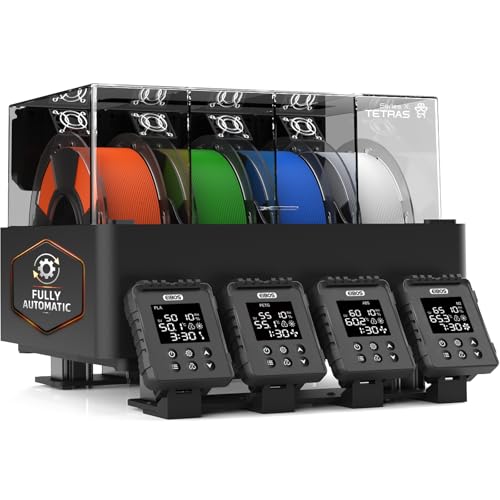 EIBOS Tetras Active drying positioned around the AMS you already own, which closes the window between drying a spool and printing with it. | Best if you want to dry while the AMS feeds AMS owners — active drying that works with the unit you already bought | |
| 3 | 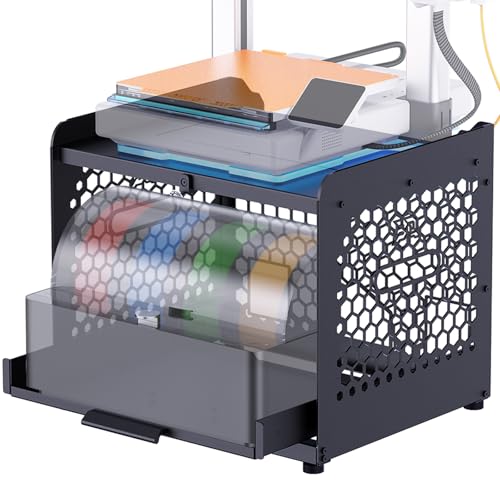 BIQU Panda Stack An aluminum multi-layer rack that gets the AMS Lite, four spools and the accessories off the desk and onto a frame. | Best under $200 for an A1 or A1 mini with an AMS Lite Getting an A1's spools, AMS Lite and accessories off the desk and onto a frame | $159.99 · View on Amazon #ad We earn a commission · price as of November 23, 2026 |
| 4 |  Polymaker PolyDryer Sealed per-spool boxes with a cited 10-20% RH, so the filament waiting its turn is not quietly getting wet. | Best for the spools that are not in the AMS Sealed storage first, active drying second — the per-spool approach | |
| 5 |  BIQU Panda Claw Extruder Gear Set Hardened, coated extruder gears for the X1, P1 and A1 series - the repair for a unit that is chewing filament instead of pushing it. | Budget pick - the part that fixes an AMS that has stopped feeding Worn extruder gears that are chewing filament instead of pushing it |
Under $200, the best AMS upgrade is a four-spool dryer with an infinite timer — the EIBOS Cyclopes. An AMS holds four spools, so the failure you hit is a wet set rather than a wet spool, and drying one at a time while three re-absorb is the most common mistake in this category. If you want to close the gap completely, the EIBOS Tetras dries while the AMS feeds the printer, which no standalone box can do. On an A1 or A1 mini, the BIQU Panda Stack is the one: the AMS Lite is open-air and has to live somewhere. The budget pick is the BIQU Panda Claw extruder gear set, which is the repair for an AMS that has stopped feeding rather than an upgrade.
One thing to know before you start: you cannot buy an AMS unit itself in this band. Bambu Lab sells every AMS direct rather than through Amazon, so none has a listing for this site's price layer to read, and the AMS 2 Pro sits above this line regardless. So the real question under $200 is what makes the unit you already own stop failing — and the answer is almost always moisture or feed.
Why $200, and what the band excludes
The line comes from this site's own price layer rather than from a round number. On 22 November 2026, five registry products that upgrade an AMS workflow carried a live Amazon price under it — clear of the three-product minimum this site requires before writing a price-band page, and all five sat under it with real headroom rather than by a margin a single price change would erase.
The exclusion is more informative than the inclusions. No AMS unit appears here, and not because of the price: Bambu sells the AMS, the AMS 2 Pro, the AMS Lite and the AMS HT direct, so not one of them has an Amazon listing for the price layer to read. Pretending otherwise would be the easy way to write this page. Those units are ranked honestly on the AMS accessories roundup and the AMS 2 Pro review, where no price claim is made about them either.
The third-party route is also above the practical scope of this page: the one open-source four-spool feeding system in this registry is covered on AMS alternatives, which is the page to read if adding automatic switching — rather than fixing an existing setup — is the goal.
The two things that actually break an AMS workflow
1. Moisture, and the AMS only half-solves it
This is worth being precise about, because the units differ. The original AMS has a sealed enclosure with humidity monitoring and RFID logging but no drying — it monitors humidity, it does not do anything about it, so a wet spool loaded there stays wet. The AMS 2 Pro added active drying, which is exactly why it is the upgrade this site usually recommends. And the AMS Lite is open air with no sealed chamber and no drying at all, which means an A-series multi-colour setup has zero moisture protection between prints.
So the right purchase depends on which unit you have. If yours does not dry, the whole top half of this page is aimed at you. Drying filament in an AMS covers what each unit can and cannot do, and AMS HT against a filament dryer compares the first-party high-temperature route.
2. The feed path, which has nothing to do with colour
The other half, and the cheaper one. An AMS is a long mechanical path: gears, PTFE tube, buffer, hub. When it stops loading reliably the cause is usually physical rather than configurational — worn extruder gears chewing filament instead of gripping it, or a tube that needs replacing. Both are cheap fixes that get mistaken for a failing unit. Filament not feeding is the diagnostic order.
The five upgrades, side by side
| Upgrade | Failure it fixes | Capacity or fitment | Distinguishing feature |
|---|---|---|---|
| EIBOS Cyclopes | A whole set of spools going wet | Four spools | Cited infinite timer; 100 W PTC heater |
| EIBOS Tetras | Re-absorption between drying and printing | Works with a compatible AMS | Dries actively while the AMS feeds |
| BIQU Panda Stack | An AMS Lite taking over the desk | A1 and A1 mini | Aluminum; supports a dual AMS setup |
| Polymaker PolyDryer | The spools that are not loaded | One spool per box, modular | Sealed storage, cited 10-20% RH |
| BIQU Panda Claw gear set | A unit that has stopped feeding | X1, P1 and A1 series | Hardened coated gears; better TPU grip |
Who should buy what
You own an AMS or AMS Lite with no active drying. The Cyclopes. Dry the set, not the spool.
Your prints fail late in long jobs. The Tetras, after verifying fitment — drying during the print is the only thing that fixes an eight-hour window.
You own an A1 Combo and your desk has disappeared. The Panda Stack. It will not improve a print and it is still the upgrade you notice daily.
Your filament collection is bigger than four spools. PolyDryer boxes, starting with one.
Your AMS has started failing to load. The Claw gear set, and read the feed diagnostics first — it is a repair, not an upgrade.
You want four colours on a machine that has none. None of these. Read AMS alternatives and the AMS 2 Pro upgrade kit instead; this page is about making an existing setup reliable.
What this page is and is not based on
The $200 line was set and verified against this site's live Amazon price layer on 22 November 2026; no price is written into the copy and every button carries its own date. AMS unit types, their drying behavior, humidity monitoring, RFID logging and compatibility, and the capacities, cited heater wattages, timers, humidity figures, materials and fitment lists of every accessory, are the manufacturers' or cited retailers' published figures held in this site's registry, cross-referenced against the cited BIQU Panda upgrade guide, with vendor-stated benefits labeled as claims. The PETG HF drying guidance and the TPU 95A HF humidity statement are quoted from Bambu Lab's own product pages, retrieved 22 November 2026. No unit or accessory on this page has been run, fitted or measured by this site, and no humidity reading of our own exists. See how we review.
Every pick in full
1. Best overall AMS upgrade under $200
EIBOS Cyclopes
Four spools dried at once with a cited infinite timer, so the whole set you are about to load stays dry instead of taking turns.
The honest top pick for an AMS owner in this band, because it matches the shape of the problem. An AMS holds four spools, and the failure mode people actually hit is not a wet spool — it is a wet set. Dry one spool in a single-spool box while the other three sit on a shelf re-absorbing, load all four, and you have printed with three wet spools and one dry one. A four-spool unit is the only capacity that matches a four-colour job.
The cited infinite timer is what makes it the pick rather than just a box. An AMS workflow is continuous — spools come out, go back, sit for a week — and a unit that can stay on indefinitely becomes dry storage that happens to be heated rather than an appliance you remember to start. The cited 100 W PTC heater for four spools is efficient for the volume it holds, which matters precisely because you might leave it running. It is also a direct competitor to the four-spool SUNLU at a similar capacity, so compare both on today's live figures — SUNLU alternatives sets those two side by side.
Honest cons. Running a dryer continuously costs power, and for genuinely long-term storage a sealed box with desiccant is cheaper and does not plug in. It is a standard-temperature class unit, so nylon and PC are out of its range. And four-spool dryers are big: measure the shelf, because an AMS is already occupying the space beside or above the printer.
What it gets right
- An infinite timer means the unit can simply stay on as dry storage, not just run a cycle
- Four spools at a 100 W PTC heater is efficient for the volume it holds
- Direct competitor to the SUNLU S4 at a similar capacity, so shop both
What it does not
- Running a dryer continuously as storage costs power — consider a sealed box with desiccant for long-term storage instead
- Standard-temperature class, so nylon and PC are not its job
- Four-spool footprint again: measure the shelf first
| Capacity | Four spools |
|---|---|
| Heater (cited) | 100 W PTC |
| Timer (cited) | Infinite |
2. Best if you want to dry while the AMS feeds
EIBOS Tetras
Active drying positioned around the AMS you already own, which closes the window between drying a spool and printing with it.
The pick that attacks the one gap every standalone dryer has. You dry a spool, you take it out, and re-absorption starts immediately. This is positioned as active drying that reuses the AMS you already bought rather than a box the filament has to leave, which is a different product rather than a cheaper one.
The manufacturer's own guidance is the argument. Bambu's PETG HF page states the filament must be dried before use and remain moisture-free during the printing process, especially for longer print times, and TPU 95A HF is described as highly sensitive to humidity with drying recommended before use and after storage. “During” and “after storage” are the operative words, and a cycle-and-remove dryer cannot satisfy either on an eight-hour four-colour print. It is also cheaper than an AMS 2 Pro upgrade if drying was the only reason you were considering one, which is the comparison most readers are really making — the AMS 2 Pro upgrade kit is the other side of it.
Honest cons. Its entire value depends on owning a compatible AMS, so verify fitment for your exact unit before buying — AMS compatibility is the page. Without an AMS, a plain four-spool dryer is simpler and cheaper. More parts in the filament path is more places for a feed problem to start. And this is the pick on the page that sits closest to the $200 line — it had headroom at the last check, but it is the one here a price change could push over, so read the live figure on the button rather than the headline.
What it gets right
- Built around the fact that you already own an AMS, rather than asking you to replace it
- Active drying while the AMS feeds the printer closes the gap between drying and printing
- Cheaper than an AMS 2 Pro upgrade if drying is the only reason you were considering one
What it does not
- Its whole value proposition depends on you owning a compatible AMS — verify fitment for your exact unit
- If you do not have an AMS, a plain four-spool dryer is simpler and cheaper
- More parts in the filament path is more places for a feed problem to start
| Positioning (cited) | Best for Bambu Lab AMS owners |
|---|---|
| Approach (cited) | Active drying that reuses the AMS you own |
#ad We earn a commission · price as of November 23, 2026
3. Best under $200 for an A1 or A1 mini with an AMS Lite
BIQU Panda Stack
An aluminum multi-layer rack that gets the AMS Lite, four spools and the accessories off the desk and onto a frame.
The A-series answer, and the problem it solves is specific to that machine. The AMS Lite is an open-air unit by design: four spools mounted above the printer, with no enclosure. On a desk that already has a printer on it, the result is that the multi-material setup takes over the whole surface, and vertical is the only direction left.
This is an aluminum alloy multi-layer rack with listed fitment for the A1 and A1 mini, which supports a dual AMS setup. Aluminum rather than printed is the point: four loaded spools will slowly flex a printed frame, and the sag is gradual enough that you blame something else. Supporting a dual setup matters because two four-spool units is exactly where the desk problem stops being annoying. AMS for an A1 mini covers the unit itself, and if you have also boxed the printer in, the A1 enclosure page covers that pairing.
Honest cons, bluntly. It is pure organization and will not improve a single print. It is A1 and A1 mini fitment only. And a printed riser costs filament and an evening instead of money — printed against bought makes that call, and for this part it is genuinely close.
What it gets right
- An A1 with AMS Lite takes over a desk; a vertical rack is the only real fix
- Aluminum alloy, so it does not flex under four loaded spools the way a printed frame does
- Supports a dual setup, which is where the desk problem becomes genuinely unmanageable
What it does not
- Pure organization — it will not improve a single print
- A1 and A1 mini only
- A printed riser costs you filament and an evening instead of money
| Type | Aluminum alloy multi-layer rack |
|---|---|
| Fits | Bambu Lab A1 and A1 mini |
| Supports | Dual AMS and ViViD setup |
4. Best for the spools that are not in the AMS
Polymaker PolyDryer
Sealed per-spool boxes with a cited 10-20% RH, so the filament waiting its turn is not quietly getting wet.
The pick that addresses the half of the problem an AMS cannot. An AMS holds four spools; a working filament collection is more than four. Everything else is sitting on a shelf in room air, and whichever spool you load next came from there. This is the modular answer: passive sealed storage plus active drying, per spool, with a cited humidity figure of 10-20% RH — which is the number that actually matters in this category.
It changes the sequence rather than the hardware. Instead of drying a spool before each job, every spool lives sealed and arrives dry, which prevents the problem rather than fixing it. It is also the lowest-risk purchase here: start with one box, find out whether moisture was your problem at all, and add more only if it was. Filament dryer boxes ranks the category, and enclosing an AMS Lite is the page for the open-air units specifically.
Honest cons. Buying enough boxes to cover a full shelf adds up past the price of a four-spool dryer, so the economics invert at scale. It is standard-temperature drying and not an engineering-filament answer. And per-box storage takes more total shelf area than one stacked unit.
What it gets right
- The modular box system means every spool lives sealed, which prevents the problem instead of fixing it
- A cited 10-20% RH is the number that matters, and it is a good one
- Cheap to start with one box and add more, instead of one large purchase
What it does not
- Buying enough boxes for a full filament shelf adds up past the price of a four-spool dryer
- Standard-temperature drying — not an engineering-filament answer
- Per-box storage takes more total shelf area than a stacked rack
| Approach (cited) | Passive sealed storage plus active drying |
|---|---|
| Humidity reached (cited) | 10-20% RH |
| Entry point (cited) | From a per-box price, boxes bought individually |
5. Budget pick - the part that fixes an AMS that has stopped feeding
BIQU Panda Claw Extruder Gear Set
Hardened, coated extruder gears for the X1, P1 and A1 series - the repair for a unit that is chewing filament instead of pushing it.
Cheapest part on the page by a wide margin, and the one most likely to be the actual answer if your complaint is behavioral rather than aspirational. Extruder gears are a wear item, and a worn set causes under-extrusion and feed failures that look like six other faults — including several that get blamed on the AMS.
The cited specifics: golden nano-coated hardened steel gears with listed fitment for the Bambu X1, P1 and A1 series, supporting PLA, PETG, TPU and ABS, with improved grip and fewer jams as the stated benefit. The grip point matters most for TPU, which is the material people most often report slipping, and one part number covering X1, P1 and A1 is unusual in this category. If your AMS has started failing to load, filament not feeding is the diagnostic order and PTFE tube replacement is the other common cause.
Honest cons. This is a repair for a real symptom, not an upgrade to buy preemptively — if your gears are not worn, new gears will change nothing. An extruder teardown is the most intimidating job on the machine for a first-timer. And it is a feed-path fix, so it does nothing about moisture, which is the other half of this page.
What it gets right
- Extruder gears are a wear item, and a worn set causes under-extrusion that looks like six other faults
- Hardened and coated gears grip TPU better than the stock set, which is the common TPU-slipping complaint
- Fits X1, P1 and A1 — one part number for most of the lineup
What it does not
- This is a repair for a real symptom, not an upgrade to buy preemptively
- An extruder teardown is the most intimidating job on the machine for a first-timer
- If your gears are not worn, new gears will change nothing
| Material | Golden nano-coated hardened steel gears |
|---|---|
| Fits | Bambu X1, P1 and A1 series |
| Materials supported | PLA, PETG, TPU, ABS |
| Stated benefit | Improved grip, fewer jams |
Questions people actually ask
What is the best AMS upgrade under $200?
A four-spool dryer with an infinite timer - the EIBOS Cyclopes. An AMS holds four spools, so the problem you actually hit is a wet set rather than a wet spool, and drying one at a time in a single-spool box while the other three re-absorb is the most common mistake in this category. The infinite timer lets it double as permanent heated storage.
Can I buy an AMS for under $200?
Not through this site's price layer, and not because of the price. Bambu Lab sells the AMS, AMS 2 Pro, AMS Lite and AMS HT direct rather than through Amazon, so none of them has a listing to read a live price from, and the AMS 2 Pro sits above this line anyway. What $200 buys is making the unit you already own reliable.
Does the AMS dry filament?
It depends which one you have, and the difference is important. The original AMS has a sealed enclosure with humidity monitoring and RFID logging but no drying - it monitors humidity without doing anything about it, so a wet spool loaded there stays wet. The AMS 2 Pro added active drying. The AMS Lite is open air with no sealed chamber and no drying at all.
Why does my AMS stop feeding filament?
Usually something physical rather than configurational. Worn extruder gears chew filament instead of gripping it, and a tired PTFE tube is the other common cause - both are cheap fixes that get mistaken for a failing unit. The extruder gear set is the budget pick on this page for exactly that reason, and it is a repair rather than a preemptive upgrade.
What is the best AMS upgrade for an A1 or A1 mini?
A vertical rack, if you have the AMS Lite fitted. The AMS Lite mounts four spools in open air above the printer, which takes over a desk that already has a printer on it, and vertical is the only direction left. Aluminum matters because four loaded spools will slowly flex a printed frame.
Should I buy a dryer or upgrade to an AMS 2 Pro?
If drying is the only reason you were considering the upgrade, a dryer is the cheaper route - and a unit positioned to dry actively while the AMS feeds the printer gets you the part of the 2 Pro you actually wanted. If you also want RFID logging and the rest of the 2 Pro's behavior, that is a different purchase and the upgrade kit page covers it.
Do I need to dry filament that is already sealed in the AMS?
The spools inside a sealed AMS stay far drier than open air, but the spool you load next came from the shelf, and Bambu's own PETG HF guidance is to keep the filament moisture-free during the print rather than only before it. That is the case for sealed per-spool storage for the filament that is not currently loaded.
Will any of this reduce AMS purge waste?
No. Four-colour printing wastes filament on every tool change because one nozzle is handling several materials, and no accessory in this band changes that. The only architecture that removes purge is a machine with independent toolheads, which is a completely different purchase.
Sources
- AMS unit types, drying behavior, humidity monitoring, RFID logging and compatibility, together with the capacities, cited temperature ranges, timers, materials and fitment lists of every accessory on this page, come from this site's product registry, whose spec provenance is documented in content/products.ts - vendor positioning is labeled as cited, and no figure is asserted that a manufacturer or a cited third party did not publish
- Bambu Lab PETG HF printing tips: "PETG HF must be dried before use and remain moisture-free during the printing process, especially for longer print times (over 6 hours)", and accessory compatibility stating the filament is "Compatible with all printers, AMS, build plate, and nozzles" - Bambu Lab US store, retrieved 2026-11-22
- Bambu Lab TPU 95A HF drying recommendation: "TPU 95A HF is highly sensitive to humidity. To achieve optimal printing performance, it is recommended further drying before use and after storage" - Bambu Lab US store, retrieved 2026-11-22
- BIQU Panda hotends, build plates, fans, extruder parts and AMS accessories, with per-part fitment lists - OpenELAB upgrade guide
- Every price shown on a buy button on this page is the live Amazon figure for that listing, refreshed daily and stamped with the date it was checked. The $200 line was set and verified against those live figures on 2026-11-22, when five registry products that upgrade an AMS workflow sat under it with a buyable offer, all with real headroom - the cheapest at well under a sixth of the line. No AMS unit itself has an Amazon listing for the layer to read, because Bambu Lab sells them direct - that exclusion is stated on the page. No price is typed into the copy - see lib/prices.ts
Read this next
- The best Bambu Lab AMS accessoriesWhich AMS to buy for your printer, plus the accessories that fix feeding problems and desk space - ranked by the problem each solves.
- The AMS mods worth buyingThe faults worth paying to fix are moisture and desk sprawl. Everything else on the AMS mod lists is a printed bracket and should stay one.
- Bambu Lab AMS alternativesThe one third-party unit that adds automatic four-spool switching to an A1, A1 mini, P1P or P1S, plus the three products that cover what most AMS buyers actually want - dry, fed, organized filament.
- The best filament dryer under $300Six registry dryers carried a live price under $300 at the last check, and one of them reaches 110 C where the cheap units stop at 70. Which to buy for engineering filament, for an AMS, for four spools, and the cheapest one worth owning.
- AMS not loading filamentThe four real causes of an AMS feed failure in diagnostic order, three of which cost nothing and take minutes.
- The best Bambu Lab upgrades under $200Quick-change nozzles, a vertical rack for an A1's spools, a chamber sensor, more airflow, and the hardened hotend that should be everyone's first purchase - all with live prices under $200 at the last check.